
What a Cash-Secured Put Scanner Should Actually Filter For
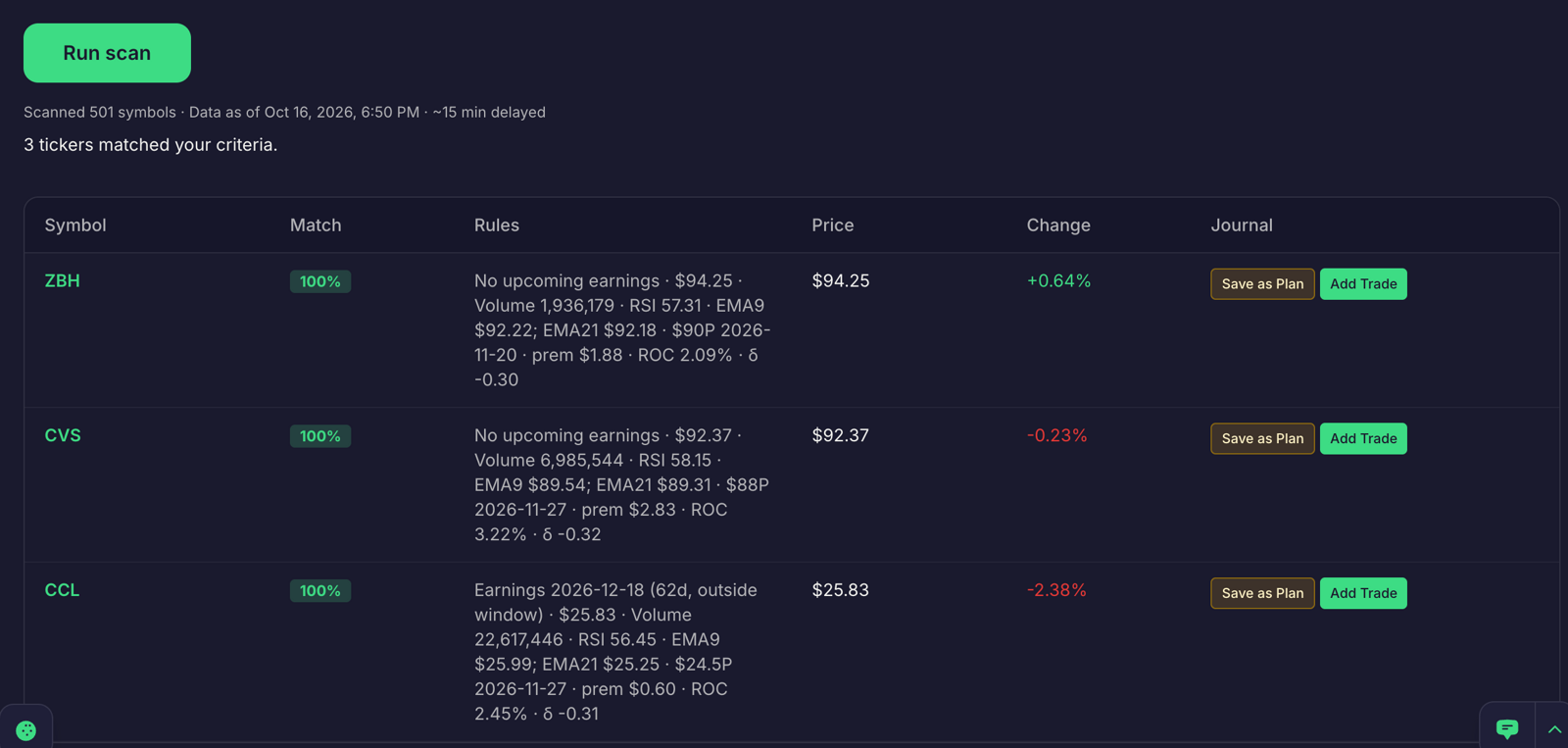
A high premium can make a cash-secured put look attractive. It does not tell you whether the contract is liquid, whether earnings fall before expiration, or whether you want to own the shares at the strike price.
A useful cash secured put scanner helps you narrow candidates using your rules, then review the risks that matter before you place a trade. That means looking beyond premium to event timing, liquidity, volatility, strike and assignment considerations, and days to expiration.
A cash-secured put involves accepting the obligation to buy shares at the strike if assigned. The Options Industry Council’s overview explains the trade’s central consideration: the premium is limited, while losses can be substantial if the stock falls sharply. A scanner should help you assess the whole setup, not just sort by credit received.
Start with the price you would accept for the shares
Before filtering contracts, decide which stocks you would be willing to own. Then examine the strike and the effective break-even price:
Break-even = strike price − premium received
Compare that break-even with the current share price, nearby support levels, recent price action, and your own view of the company. Support can help you frame a decision, but it is not a floor. A stock can move through a support area or gap lower.
Also check whether assignment fits your account. One standard contract generally represents 100 shares, so a put can require substantial cash if assigned. Consider how many shares you could afford and how much of your account they would represent. The premium does not remove the downside exposure of owning a falling stock.
Use this as your first filter: if you would not be comfortable owning the shares at the effective break-even price, leave the ticker off your candidate list.
Check earnings and other events inside the trade window
A cash-secured put scanner should make it easy to compare expiration with the company’s next earnings date. If earnings occur before expiration, the stock may make a large move while your short put is open. Decide whether you want that exposure before looking at the premium.
Review other scheduled events that could affect the stock during the holding period, such as major corporate actions. Don’t treat a higher premium around an event as automatic compensation for the additional uncertainty.
For each candidate, note:
- Earnings date: Does it fall before the option expires?
- Other scheduled events: Is there a known catalyst during the trade window?
- Your rule: Do you exclude those trades, or review them case by case?
The key is to make event exposure a deliberate choice. Don’t let it slip into the trade because the date was missed during manual watchlist checking.
Review liquidity at the contract level
A liquid stock does not guarantee a liquid option. Inspect the specific expiration and strike you are considering.
Check the bid-ask spread and compare it with the premium. A wide spread can make entry and exit more difficult, and open interest alone does not guarantee that you can trade at a favorable price. Look at current activity as well as existing open interest.
A useful options scanner should bring your attention to:
- Bid and ask: How far apart are the prices?
- Open interest and volume: Is there participation at this contract?
- Premium relative to spread: Could the spread consume a meaningful part of the credit?
Treat a quoted midpoint as a reference, not a promise of an available fill. Review the live option chain before placing an order.
Put implied volatility and delta in context
Implied volatility can help explain why one put offers a higher premium than another. Higher implied volatility can make options more expensive, but it also reflects greater expected movement. It does not tell you which direction the stock will move.
Compare volatility with the stock’s own history where that information is available, and consider whether a scheduled event helps explain the reading. Use volatility as context, not as a standalone signal to sell a put.
Delta can help you compare strikes, but it is not a guarantee of assignment or of a particular outcome. Some traders use delta as a rough probability reference; the actual result can differ. Choose a delta range that fits your plan, then check what the strike means in share-price terms.
A scanner should present these measures as decision aids. It should not replace your review of the stock, the option contract, and your willingness to accept assignment.
Choose days to expiration deliberately
Days to expiration (DTE) define how long you may carry the position and how much time remains for the stock to move. Compare expiration dates against your intended holding period and the event calendar.
A shorter expiration may require closer attention to price changes near expiration. A longer expiration leaves you exposed to the stock and its events for more time. Neither is automatically preferable. Set a DTE range that matches your process, and check that each candidate still fits it before planning the trade.
Use a consistent checklist for every put:
- Confirm the underlying is a stock you would consider owning.
- Compare the strike, premium, break-even, and nearby support.
- Check earnings and other events through expiration.
- Review the option’s spread, volume, and open interest.
- Assess volatility, delta, and DTE against your rules.
- Calculate the cash and account exposure if assigned.
Turn your checklist into a repeatable scan
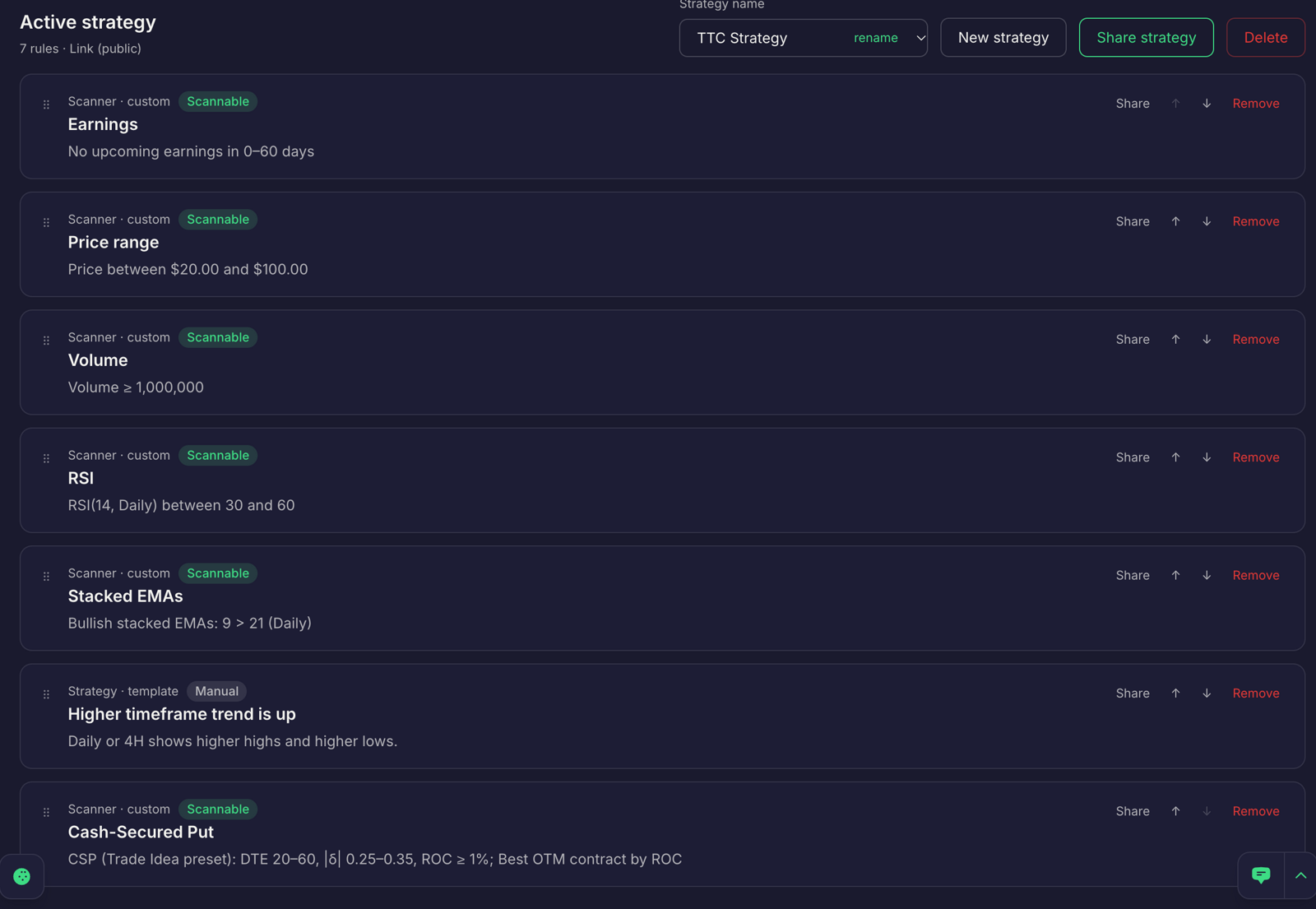
A saved strategy can reduce repeated manual screening. Instead of rebuilding your criteria each time, define your entry criteria, context filters, risk parameters, and exit conditions in one place. Then run a scan using the scannable rules available for that strategy.
In Traders Tool Chest, the Strategy builder lets you save strategy rules, with pre-built templates available. The Scanner runs saved strategy rules across a selected universe. Full US market scans across 10,000+ tickers are available with Premium ($120/month) or as a Pro add-on ($30/month).
The scanner supports options strategies, including cash-secured puts and covered calls. But don’t assume every part of the checklist above is automatically filtered in every saved scan. Where an event date, option-chain liquidity measure, or other contract detail is not covered by your available scan rules, verify it separately before planning a trade.
That distinction matters. An options scanner should help you find candidates consistently; it should not create the impression that every risk has been checked for you.
Size the put, then plan for assignment
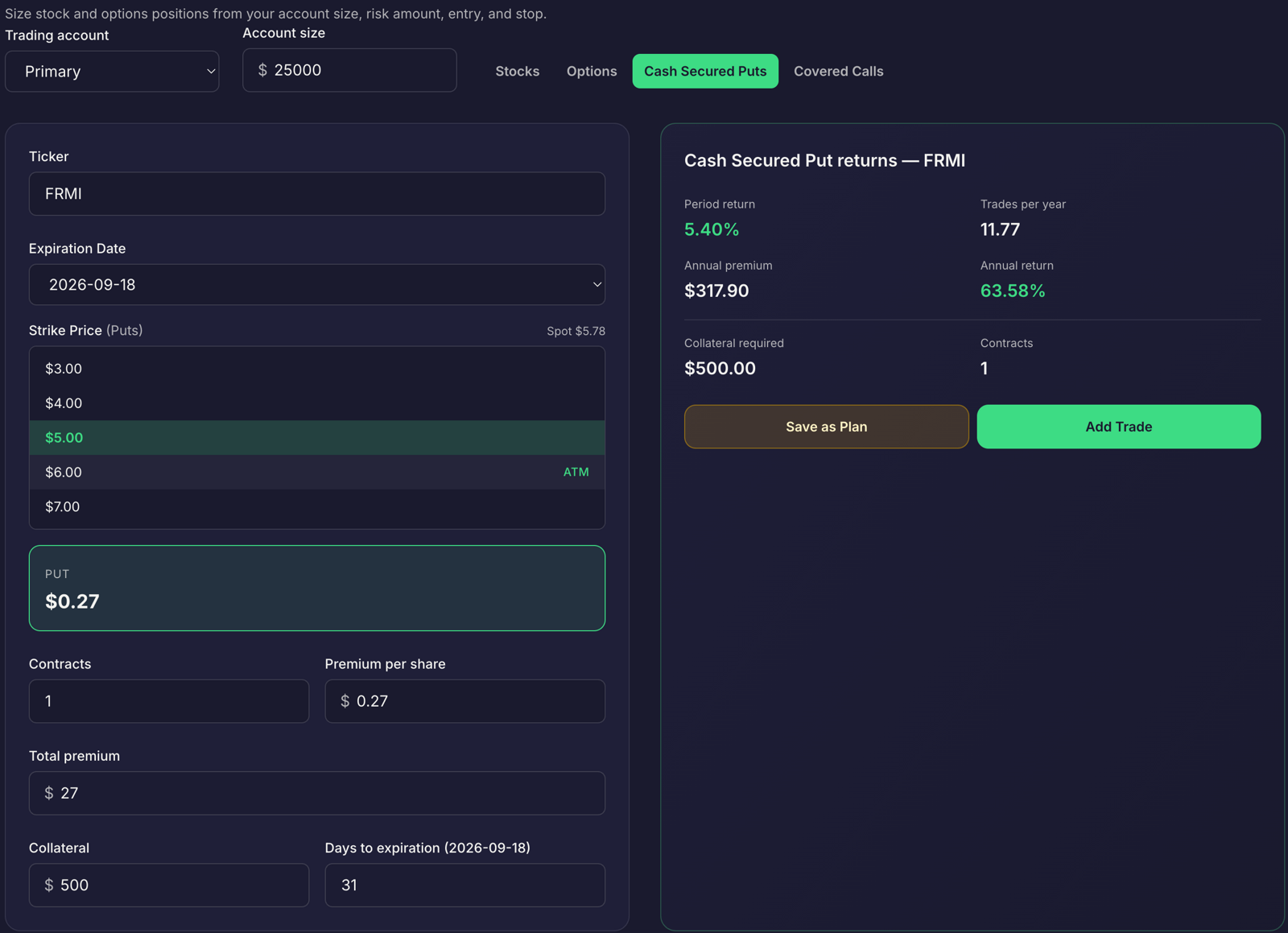
Once you have reviewed a candidate, use the cash-secured put calculator workflow to check position size before committing. Traders Tool Chest’s Risk Management calculator calculates share or contract count based on account size, entry, and stop loss. The Risk Management guide explains how to set up an options position.
Then check that you have enough cash to meet the obligation if assigned. Position size is not just about the premium you might receive; it also determines how many shares you may need to buy.
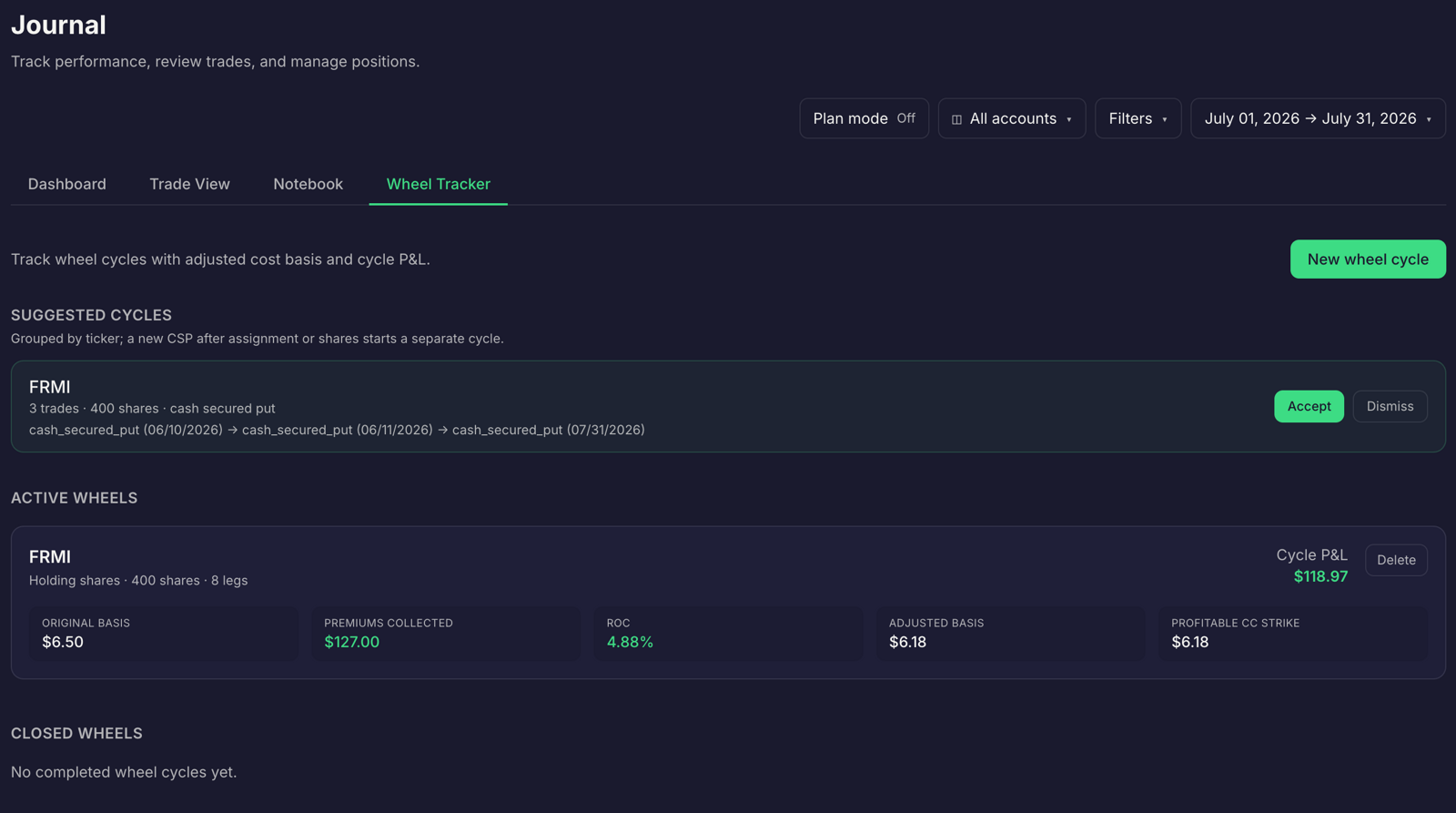
If assignment occurs and you choose to continue the Wheel, Wheel Tracker can track full Wheel cycles and adjusted cost basis. Wheel Tracker is included with Premium ($120/month) or available as a Pro add-on ($30/month). CSP/CC options-income planning, including covered-call planning after assignment, is included with Premium or available as a Pro add-on ($30/month). A covered call calculator can help you assess a possible next trade, but you still decide whether the shares and call fit your plan.
Pro costs $60/month. Each add-on (full US market scans, CSP/CC options-income planning, SPX Paychecks, and Wheel Tracker) costs $30/month; Premium includes these options-income workflow features and full US market scans. See the pricing page for plan details.
Market data is roughly 15 minutes delayed, so the platform is not built for scalpers or sub-minute execution. You place orders with your broker.
Make the next scan easier to review
A disciplined cash-secured put scanner filters for more than premium. It helps you compare the event window, contract liquidity, volatility context, strike, assignment exposure, and DTE against rules you have already defined.
Save your criteria, scan for candidates, verify details the scan does not cover, and calculate position size before placing an order. No tool guarantees profit. Every decision, and every position, remains yours.
FAQ
Should I choose a cash-secured put based on premium alone?
No. Premium is only one part of the trade. Review the event window, liquidity, volatility, strike and break-even, assignment exposure, and DTE before deciding whether the position fits your rules.
Can Traders Tool Chest automatically filter every factor in this article?
Not necessarily. The Scanner runs your saved strategy rules, but you should verify any event or contract-level detail that your current scan rules do not cover.
What happens if my put is assigned?
You may be required to buy shares at the strike price. If you choose to continue the Wheel, Wheel Tracker is included with Premium or available as a Pro add-on for $30/month. CSP/CC planning is also included with Premium or available as a Pro add-on for $30/month.
Does Traders Tool Chest provide real-time trading or place orders?
No. Market data is roughly 15 minutes delayed, and you place orders with your broker. The platform is not built for scalpers or sub-minute execution.