How to Backtest the Strategy You Actually Trade
You tested a strategy, liked the numbers, then traded something slightly different. Most traders do. The backtest says one thing, the trading plan template in your notebook says another, and the trades you actually place follow a third set of rules. When results disappoint, the strategy takes the blame.
This guide shows you how to backtest a strategy the way you trade it, then keep the tested rules attached to every trade you place.
Why Most Backtests Fail to Match Live Trading
A backtest is only as honest as its input. Three gaps quietly break the connection between what you test and what you trade.
The tested rules differ from the written plan. You backtest "buy the pullback to the 20 EMA." Your written plan says pullback plus RSI between 40 and 50. Your live trades add a gut-feel filter when the market feels choppy. Each version produces a different result. You measured one system and traded another.
No risk parameters are included. A backtest without position sizing tells you direction, not damage. If the test assumes 100 shares per trade but your account sizes positions by feel, the drawdown you lived through has no relationship to the drawdown you measured. Risk-per-trade rules, stop placement, and size belong inside the tested rules, not beside them.
Survivorship of hand-picked setups. When you test by eyeballing charts, you remember the trades that worked. The ugly pullbacks that failed into support never make the sample. Hand-picked setups overstate performance. A test over every historical occurrence of your rules, without selection, gives you the real distribution.
Spreadsheet backtests and generic screeners can cover some of this, but they keep the rules, the sizing math, and the trade log in separate places. Each copy drifts a little further from the others.
Takeaway: before your next backtest, write down every rule you will actually follow, including size and stop. Test that document.
Define the Strategy Once, Test It Everywhere
The fix is a single source of truth. Define the strategy once, in full, and test exactly that definition. A trading strategy builder does this by storing the complete rule set:
- Define entry criteria that specify the exact pattern or condition that triggers the trade.
- Add context filters that state when the setup is valid, such as trend direction, volume, or volatility conditions.
- Set risk parameters that fix your risk per trade, stop placement, and position sizing rules before any trade exists.
- Specify exit conditions for both targets and invalidation, so the exit is never a mood.
- Use pre-built templates as a starting point if you are still formalizing your playbook.
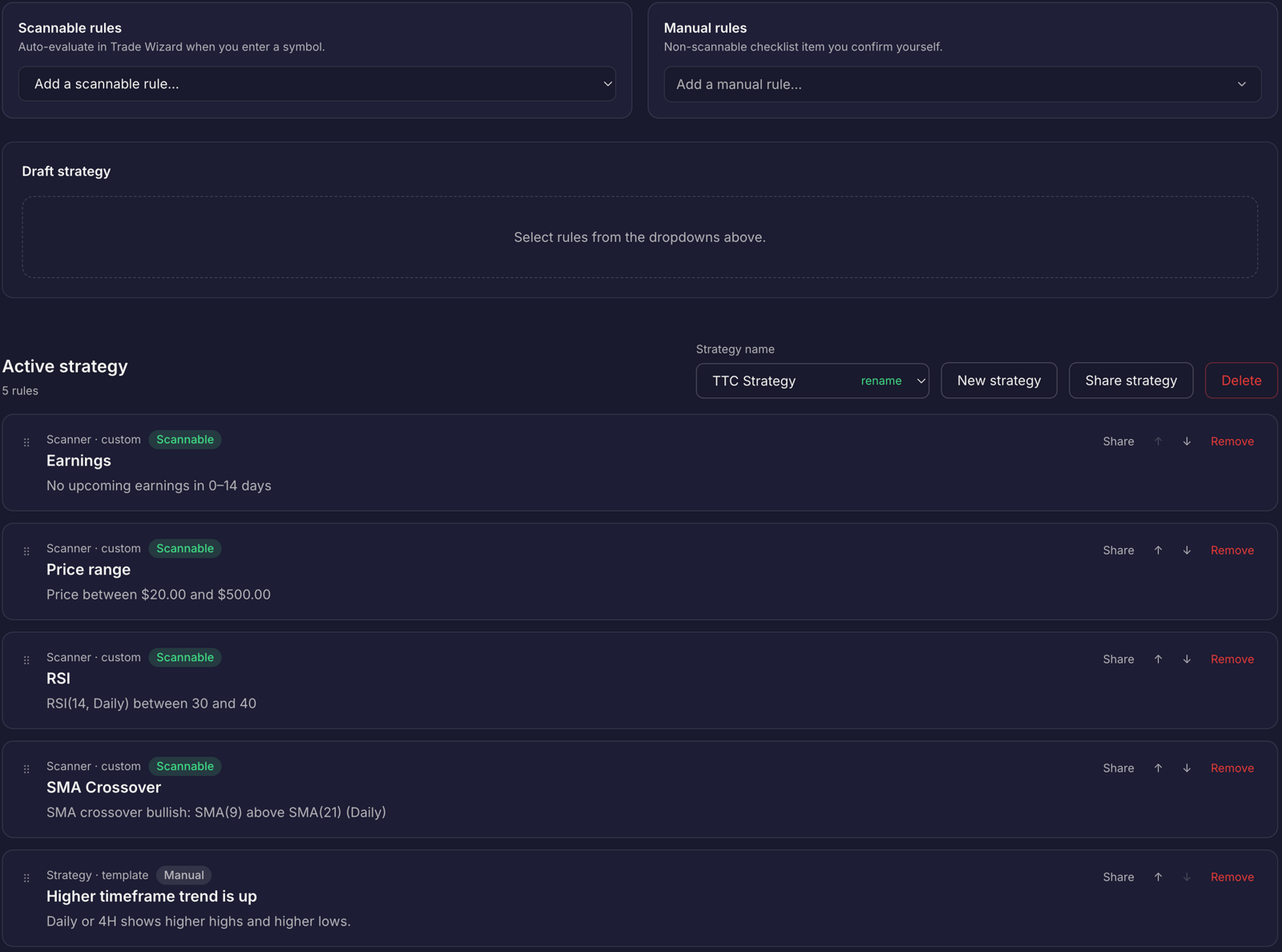
In Traders Tool Chest, the Strategy builder saves this full definition: entry criteria, context filters, risk parameters, and exit conditions in one saved rule set. Pre-built templates help you start. When the strategy lives as saved rules, the backtest has nothing to interpret. It runs the rules you saved.
Takeaway: write the strategy in the builder, not on paper. Paper versions drift; saved versions do not.
Run It Against Historical Market Data
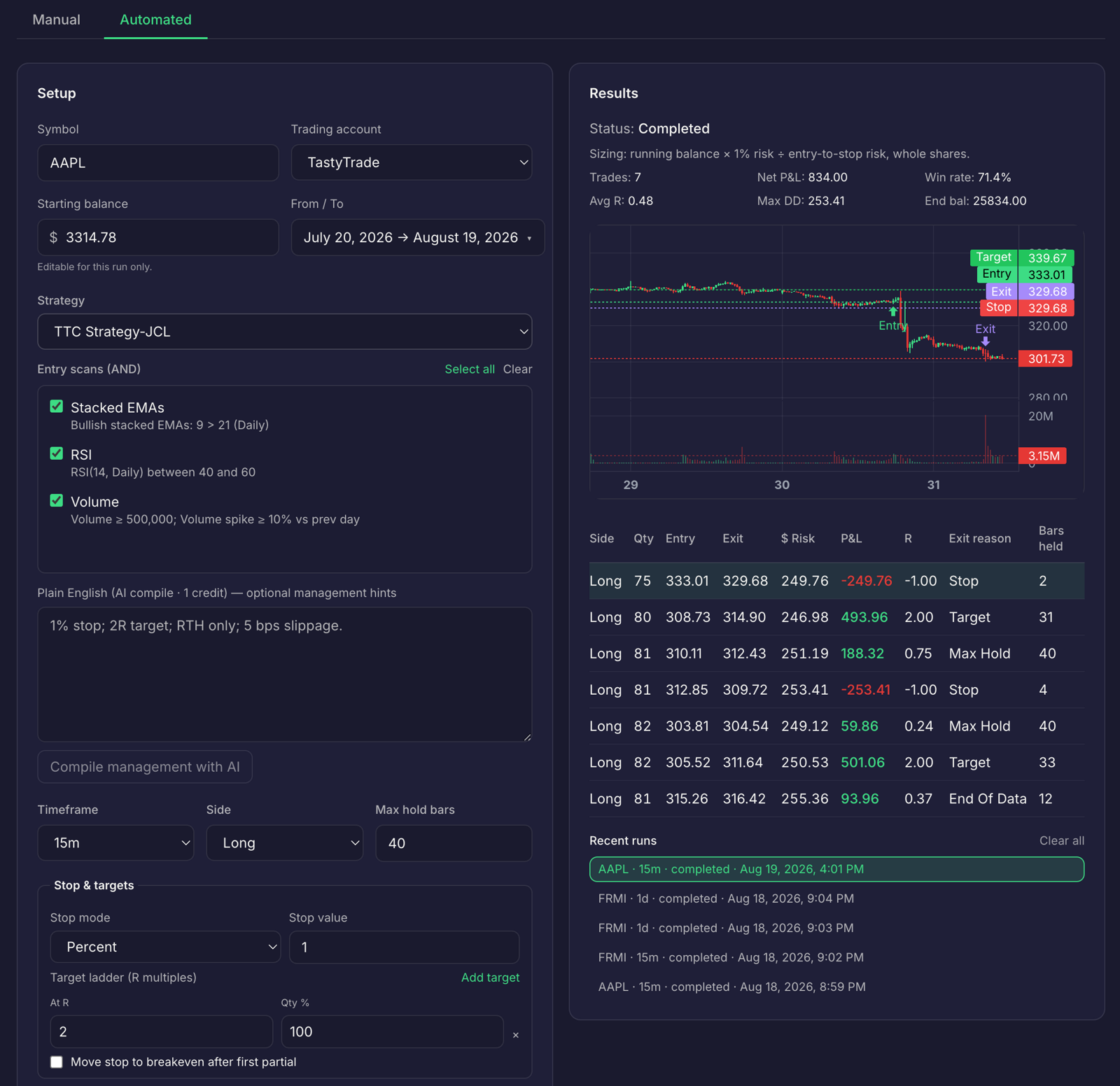
With the rules saved, run the backtest. The Backtesting engine in Traders Tool Chest tests your exact saved strategy rules against historical market data and reports four measures:
- Win rate: how often the rules produced a winning trade.
- Expectancy: the average result per trade, expressed in R.
- Drawdown: how deep the losing stretch went from peak equity.
- Equity curves: how the account grew and dipped over the test period.
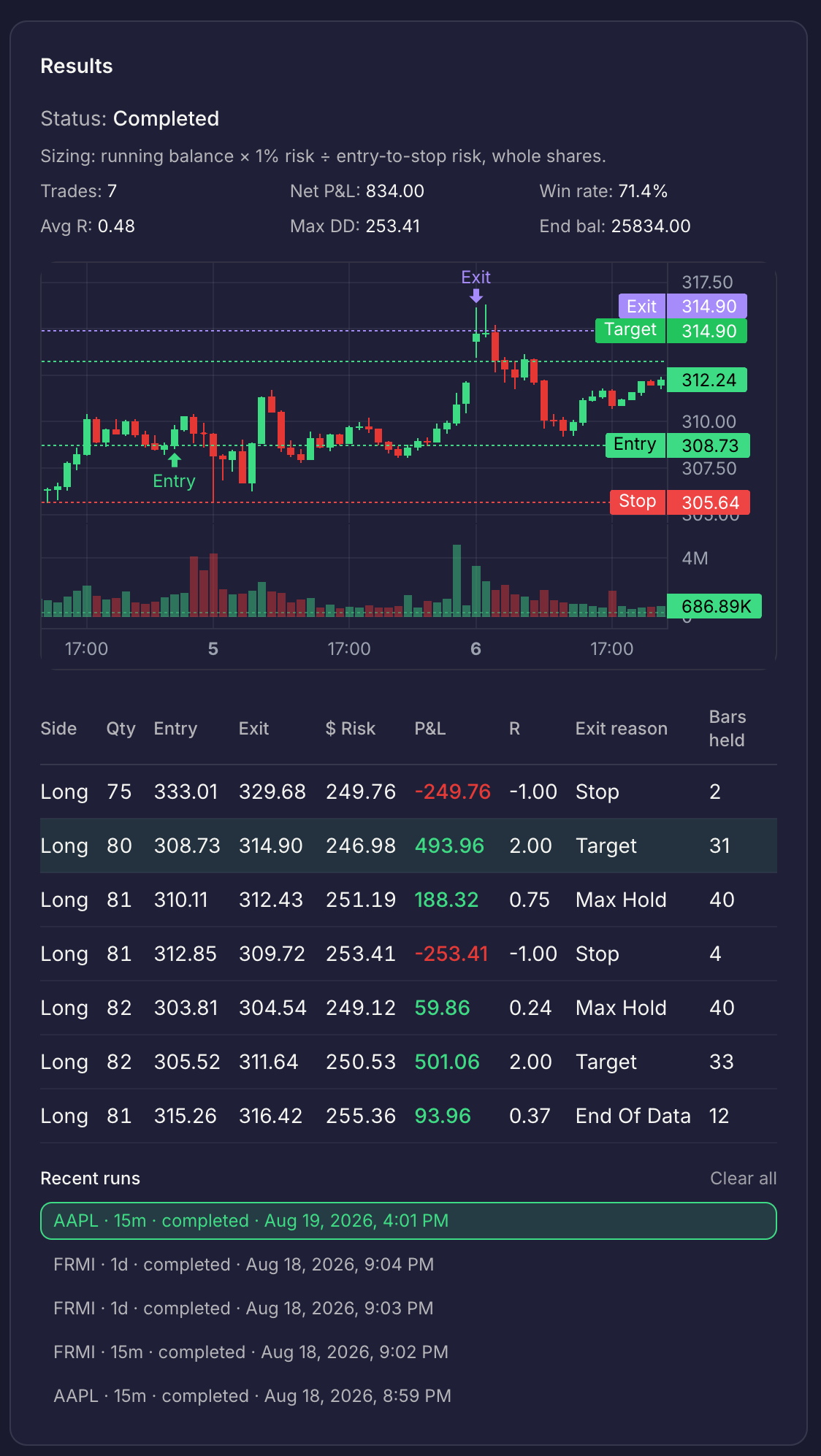
Because risk parameters are part of the saved rules, the results reflect your sizing, not an arbitrary share count. The equity curve you see is the equity curve your account would have followed, position sizing included.
Two notes on honesty. A win rate without expectancy tells you very little; a 60% win rate with a 0.2R average win can lose money after a bad stretch. And a smooth equity curve with a drawdown deeper than you can tolerate emotionally is not a strategy you will trade. Judge both.
Takeaway: run the saved rules over a long sample, then ask two questions: is expectancy positive, and can I sit through that drawdown?
R-Multiples and Expectancy, in Plain Terms
R-multiple explained simply: one R is the amount you risk on a trade. If you risk $500 and stop out, that trade is -1R. If you risk $500 and make $1,000, that trade is +2R. R-multiples measure every trade against the same yardstick, so a $5,000 account and a $500,000 account can be compared directly.
Expectancy is the average R you earn per trade over many trades:
Expectancy = (win rate × average win in R) − (loss rate × average loss in R)
Worked example. Say your rules target 2R with a 1R stop, and 100 backtested trades produce 45 winners:
- Winners contribute 45 × 2R = +90R.
- Losers contribute 55 × −1R = −55R.
- Net result: +35R over 100 trades.
- Expectancy: +0.35R per trade.
At $500 risk per trade, that is $175 of average profit per trade. Positive, but modest, which is exactly the kind of truth a backtest should hand you. If the same rules had won only 30% of the time, the math flips to −10R, and no amount of conviction fixes negative expectancy.
One caution the formula hides: expectancy assumes every trade taken. Skip the losing setups after the fact and you are computing a different strategy than the one you tested.
Takeaway: compute your expectancy in R, not in dollars, and let position sizing translate it into account currency.
From Tested Rules to Traded Rules
A backtest proves nothing until the same rule set reaches your live account. Traders Tool Chest connects that chain end to end.
The Strategy builder saves the rules. The Backtesting engine tests those exact saved rules on historical market data. The Trade Wizard turns the setup into a sized, trade-ready plan: it handles instrument selection, risk/reward definition, position sizing calculations, and rule verification, then pushes the plan to the Journal. The Journal, with Trade Replay and AI Insights, connects each live trade back to the initial strategy rules, so you can measure how closely your actual trading followed the tested rules.
To find live setups, the Scanner scans 10,000+ US tickers for setups matching your saved strategy rules. Full US market scans are available as a $30/month add-on to the Pro plan or included with the Premium plan.
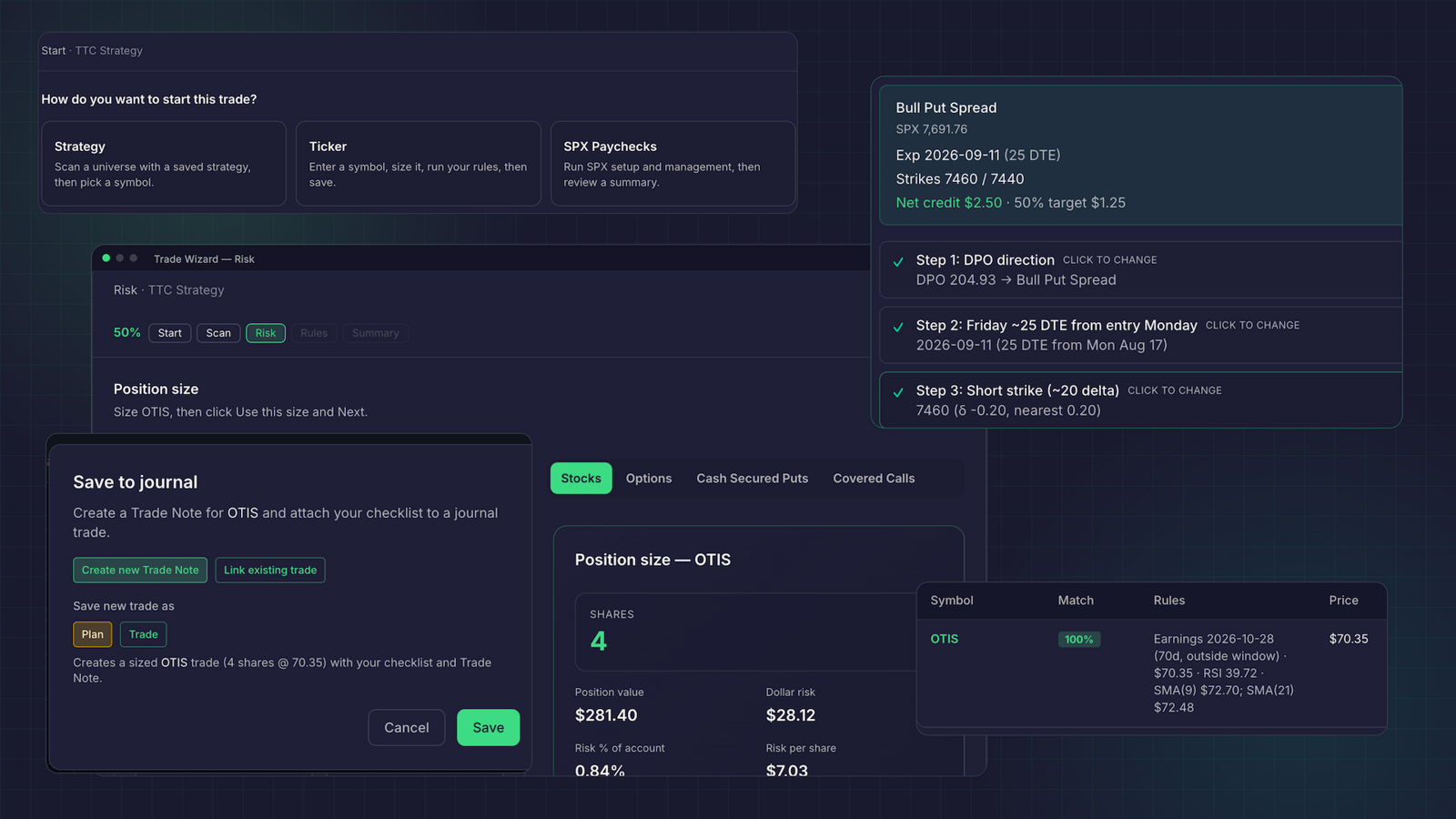
This closes the loop that backtesting software alone leaves open: plan, size, verify, trade, review. When the Journal shows live trades drifting from the tested rules, you fix the process, not the strategy.
A practical limitation, stated plainly: market data on the platform is roughly 15 minutes delayed, so Traders Tool Chest is not built for scalpers or sub-minute execution. Orders are placed with your broker, and the platform handles the planning, sizing, and review around them.
Takeaway: backtest the saved rules, trade the plan the rules produce, and let the journal measure the gap between the two.
Plans and Pricing
- Choose the Pro plan at $60/month for the connected core: Strategy builder, Backtesting, Trade Wizard, Journal, and Scanner.
- Add each Pro add-on at $30/month: full US market scans, CSP/CC options-income planning, SPX Paychecks, or Wheel Tracker.
- Choose the Premium plan at $120/month to include every add-on.
Frequently Asked Questions
How many trades does a backtest need to be meaningful?
More than most traders expect. A small sample produces noisy win rate and expectancy figures that reverse with a handful of new trades. Test the saved rules over every historical occurrence of the setup you can, then treat one bad month or one great month as a data point, not a verdict.
Does Traders Tool Chest place trades for me?
No. Orders are placed with your broker. The platform plans, sizes, verifies, and reviews the trades. Market data is roughly 15 minutes delayed, so it is not built for scalpers or sub-minute execution; it fits traders working on swing, position, and income timeframes.
Do I need the Premium plan to backtest my saved rules?
No. The Strategy builder, Backtesting engine, Trade Wizard, and Journal are part of the core Pro plan at $60/month. The $30/month add-ons, including full US market scans across 10,000+ tickers, CSP/CC options-income planning, SPX Paychecks, and Wheel Tracker, are optional on Pro and included with Premium at $120/month.
Can I use R-multiples if my trades are options rather than stocks?
Yes. One R is whatever you define as risk on the trade, so a defined-risk options position works the same way: risk the premium or spread width you commit, and measure results in R. The Risk Management calculator sizes stock and options positions from your account size, entry, and stop, keeping the R math consistent across strategies.
A Plain Disclaimer
Backtesting shows historical behavior, not future results. Markets change, edge decays, and past expectancy does not promise future expectancy. Use backtests to understand your rules, sizing, and drawdown tolerance, then make your own decisions. Every trade and every dollar you risk remains your responsibility.