
Stop Wasting Time on Manual Scans: Try These 7 Quick Hacks
Flipping through charts one at a time can eat up your morning before you reach a trade decision. It can also make your review inconsistent: one day you check your whole watchlist, and the next day you stop after the first few charts.
A stock scanner can narrow that work to candidates that match rules you define. It won’t tell you which one will win, and it won’t replace chart review. The practical benefit is simpler: spend less time searching and more time checking whether a setup fits your plan.
Here are seven ways to make your scanning routine more focused.
1. Scan the whole market instead of a curated watchlist
A watchlist is useful for tracking symbols you already know. It can also limit what you see. If a setup forms outside your list, you may miss it simply because you weren’t looking at that ticker.
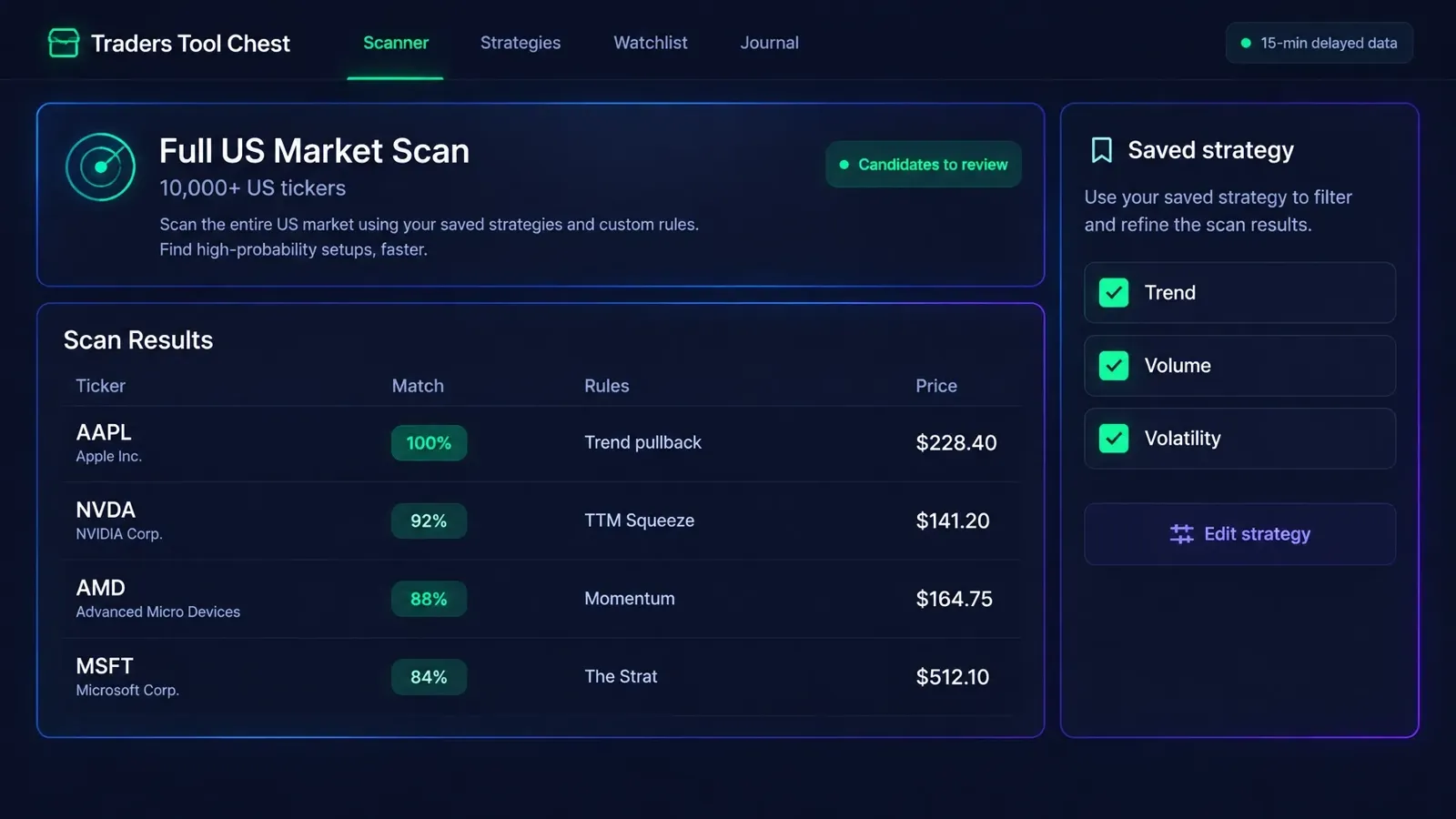
Broaden the search before you review individual charts. Traders Tool Chest scans more than 10,000 US tickers for matches to your strategy rules with full US market access. That access is a $30/month Pro add-on or included with Premium at $120/month. Pro starts at $60/month.
A broader scan gives you more candidates to evaluate, not more reasons to trade. Review the results against your rules, then decide what merits attention.
2. Save your strategy rules once and scan for matches
If you rebuild your filters every morning, small changes can creep in. You might adjust a threshold, forget a condition, or skip a rule when you’re short on time.
Use the Strategy builder to define your entry criteria, context filters, risk parameters, and exit conditions. It includes pre-built templates to help you get started. Save the rules, then run the scan against that same definition when you review the market.
That consistency makes it easier to compare one morning’s candidates with another’s. It also makes the scan more useful: you can see which symbols matched your rules instead of relying on memory or a fresh set of improvised filters.
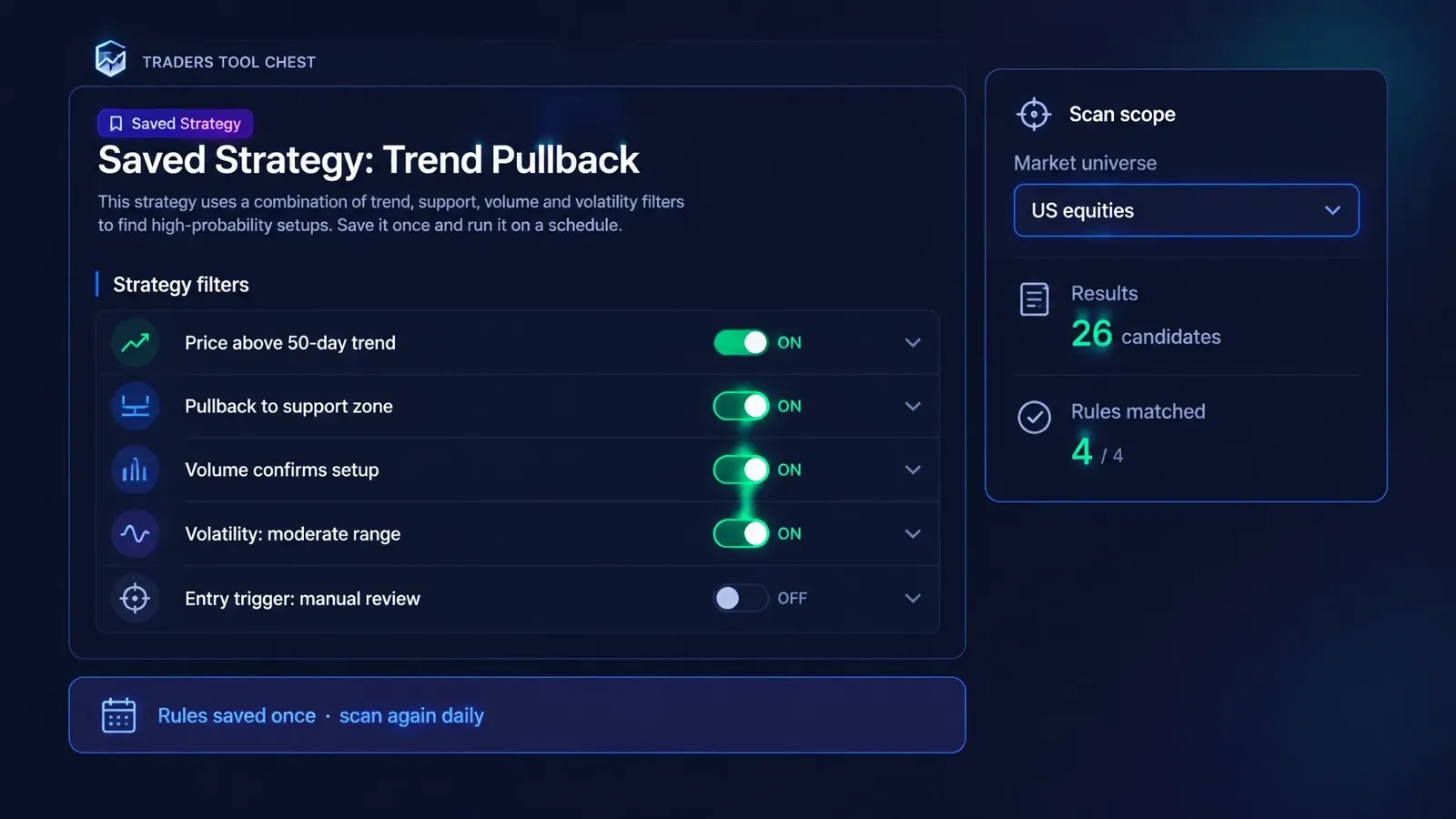
See how to create and configure a strategy.
3. Filter by context, not just by signal
A signal on its own may leave too much chart review. A price move, for example, doesn’t show whether the broader trend or trading conditions fit your setup.
Add context filters that support the specific strategy you’re building. Depending on the rules available for your setup, that may include:
- Check trend: Confirm whether the price action fits your trend direction.
- Review volume: Use activity as context rather than treating a price signal as the whole setup.
- Define volatility conditions: Decide what kind of volatility state suits your strategy.
- Keep the filter purposeful: Add conditions because they matter to your rules, not just to make the results list shorter.
A filter helps sort candidates. It doesn’t confirm that a trade is safe or likely to work. Review the chart and your risk plan before deciding what to do.
4. Run separate scans for separate playbooks
One scan that mixes several strategies can produce a noisy list. A setup you trade as a pullback may need different conditions from a volatility setup or an options-income strategy.
Build distinct rule sets for the playbooks you actually use. For example, run a trend pullback scanner for pullbacks in your chosen trend context, a TTC Compression scanner for squeeze-related conditions, and a The Strat scanner for rules-based Strat setups. Review income strategies separately from stock patterns.
Traders Tool Chest works as both a stock scanner and an options scanner. It checks technical, momentum, TTC Compression, The Strat, and options strategy conditions. Options-income features have plan requirements: CSP/CC planning and trade ideas are a $30/month Pro add-on or included with Premium. SPX Paychecks for defined-risk credit spreads is also a $30/month Pro add-on or included with Premium.
Separate scans make it easier to judge each result against the right playbook. They don’t make every match a trade.
5. Set a morning routine and time-box it
A scan can save search time, but only if you keep the review bounded. Without a stopping point, it’s easy to keep adding filters or opening charts long after you’ve identified the candidates worth reviewing.
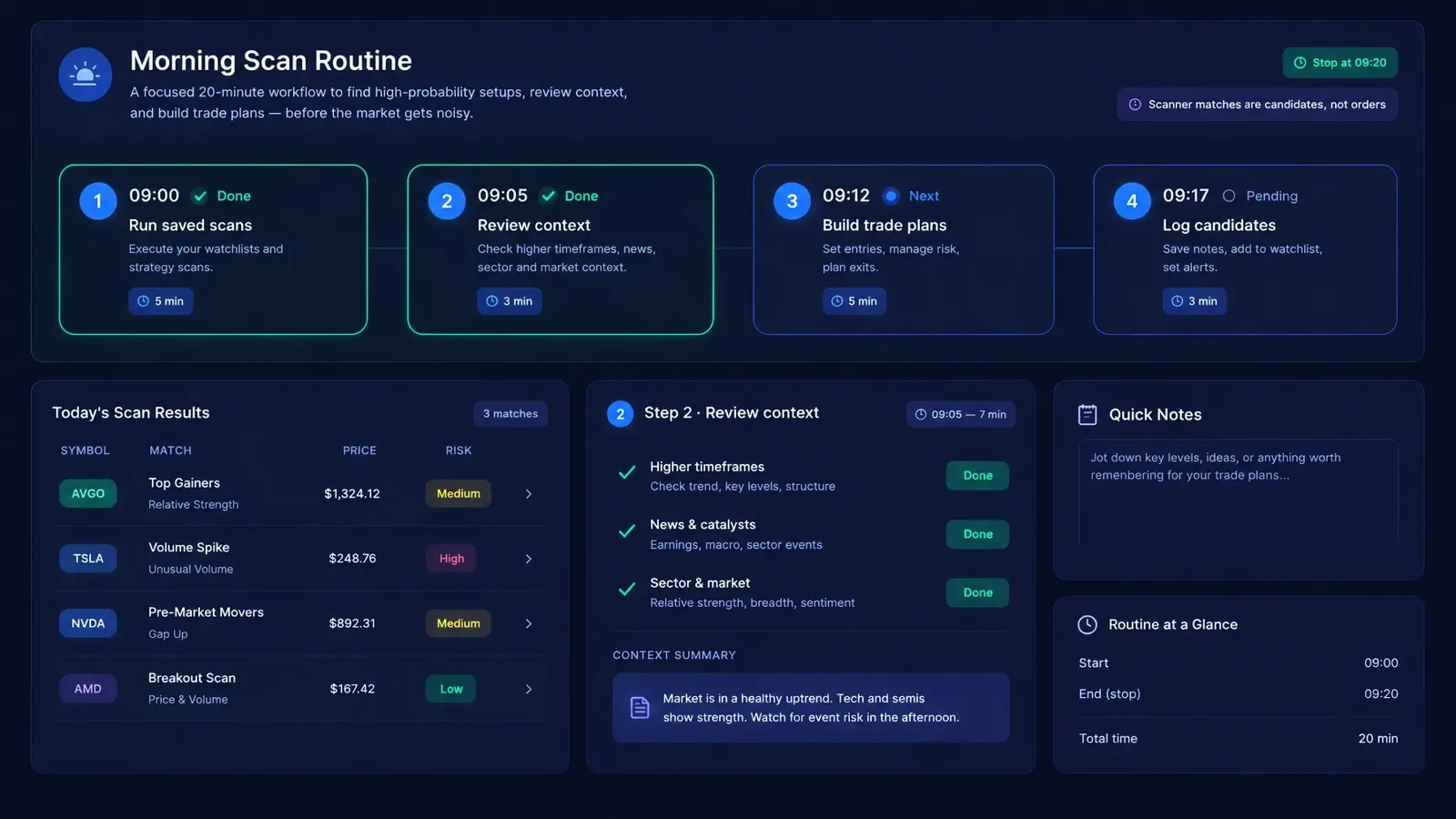
Try a simple 20-minute routine:
- Run saved scans for the strategies you plan to trade.
- Review context on the strongest matches.
- Check your rules before building any trade plan.
- Record candidates for follow-up or a no-trade decision.
- Stop at your set time and move on to the next part of your process.
Traders Tool Chest market data is roughly 15 minutes delayed. The platform is designed for scanning and planning, not scalping or sub-minute execution. If your approach depends on real-time data, keep using a suitable real-time tool.
6. Move scan matches into a trade plan instead of handwritten notes
A ticker and a match score are only a starting point. Before an order, you still need to review the setup, define risk, and decide whether the plan fits your rules.
Instead of copying a result into a separate note and re-entering the details later, move through a connected workflow:
- Review the candidate against your chart and strategy.
- Build a plan in Trade Wizard, which can turn scan matches into sized, trade-ready plans.
- Calculate position size with Risk Management.
- Save the plan to your Journal for review.
Trade Wizard is available for stock planning on Free; stock and options planning are available on Pro and Premium. Options risk sizing is also available on Pro and Premium. You remain responsible for reviewing the plan. Orders are placed with your broker.
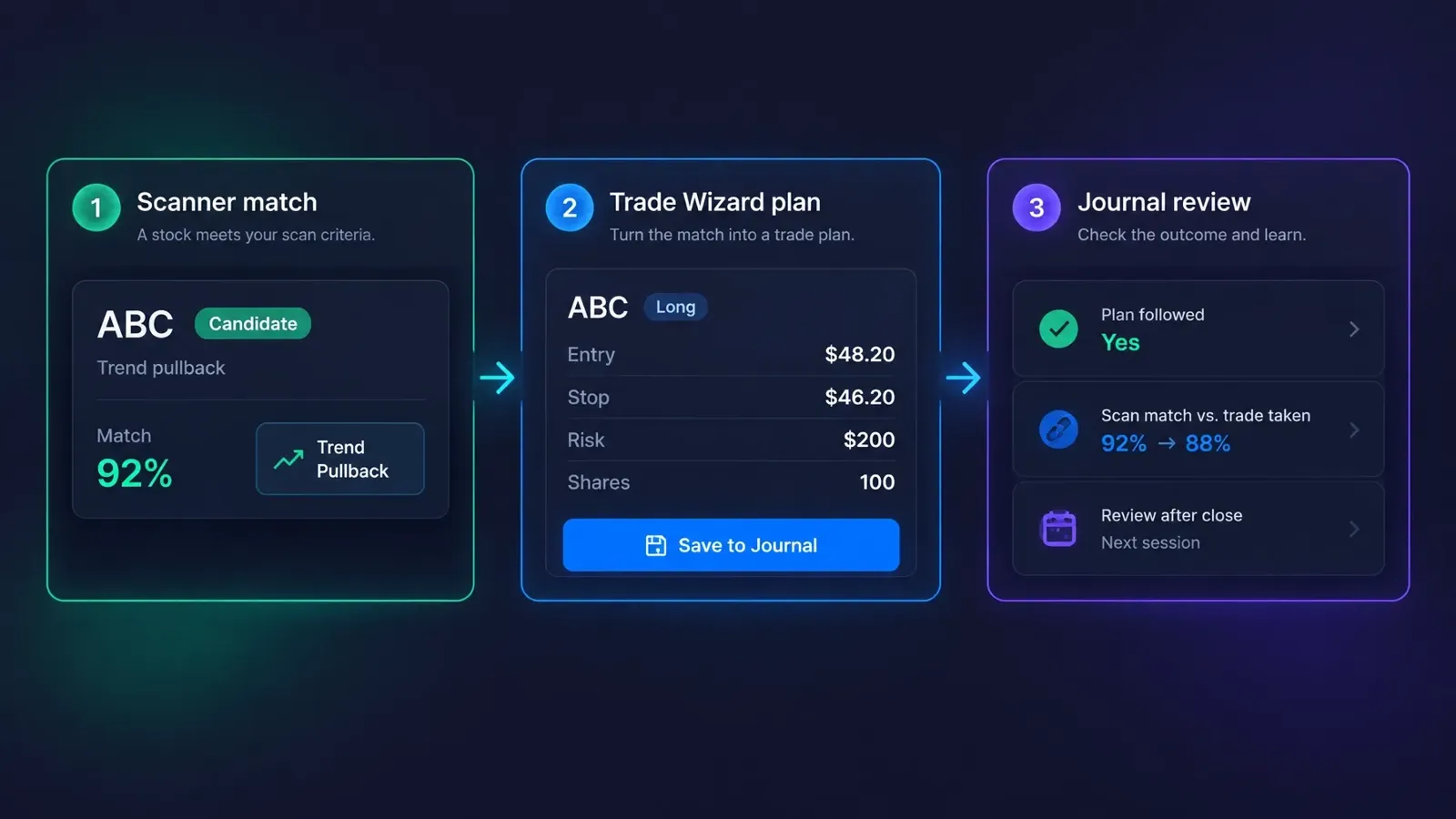
Learn how to run a Trade Wizard scan using a saved strategy.
7. Journal what the scan found and what you actually traded
A scan can return matches every day, but that doesn’t tell you whether those matches are useful for your process. Keep a record so you can compare the candidates with your actual decisions.
For each scan session, note the strategy, the symbols that qualified, which candidates you reviewed, and which, if any, you traded. Afterward, compare the plan with your execution. Did you follow the setup rules? Did you skip a match for a clear reason? Did you take a trade that never matched your scan?
The Traders Tool Chest Journal connects trade plans and trades to your process. Journal trade logging is available on Free; Pro and Premium add features including Trade Replay and AI tools with usage credits. A short candidate note still helps you compare what the scan surfaced with what you chose to trade.
Choose the scan access that fits your workflow
- Pro, $60/month: Core platform access.
- Full US market scans, $30/month Pro add-on: Scan 10,000+ US tickers, or get full-market access with Premium.
- CSP/CC planning and trade ideas, $30/month Pro add-on: Included with Premium.
- SPX Paychecks, $30/month Pro add-on: Included with Premium.
- Premium, $120/month: Includes the full set of features and add-ons.
See the Traders Tool Chest pricing page for plan details.
Frequently asked questions
Does a stock scanner tell me what to buy?
No. A scanner identifies candidates that match rules you define. Review each candidate and make your own trading decision.
Can Traders Tool Chest scan all US tickers?
Yes. Full US market scans cover more than 10,000 US tickers. They’re available as a $30/month Pro add-on or included with Premium at $120/month.
Is Traders Tool Chest data real time?
No. Market data is roughly 15 minutes delayed.
Do I need Premium to scan options income strategies?
Not necessarily. CSP/CC planning and trade ideas, and SPX Paychecks, are available as separate $30/month Pro add-ons. Premium includes them.
Keep the scan connected to your process
A more consistent scan starts with rules you can repeat. Search a wider universe, separate your playbooks, time-box your review, and carry selected matches into a risk-sized plan and journal entry. The scanner helps you find candidates; it does not make the decision for you.
No tool guarantees profit. Every trading decision remains yours.