
How to Track a Full Wheel Cycle Without Losing the Thread
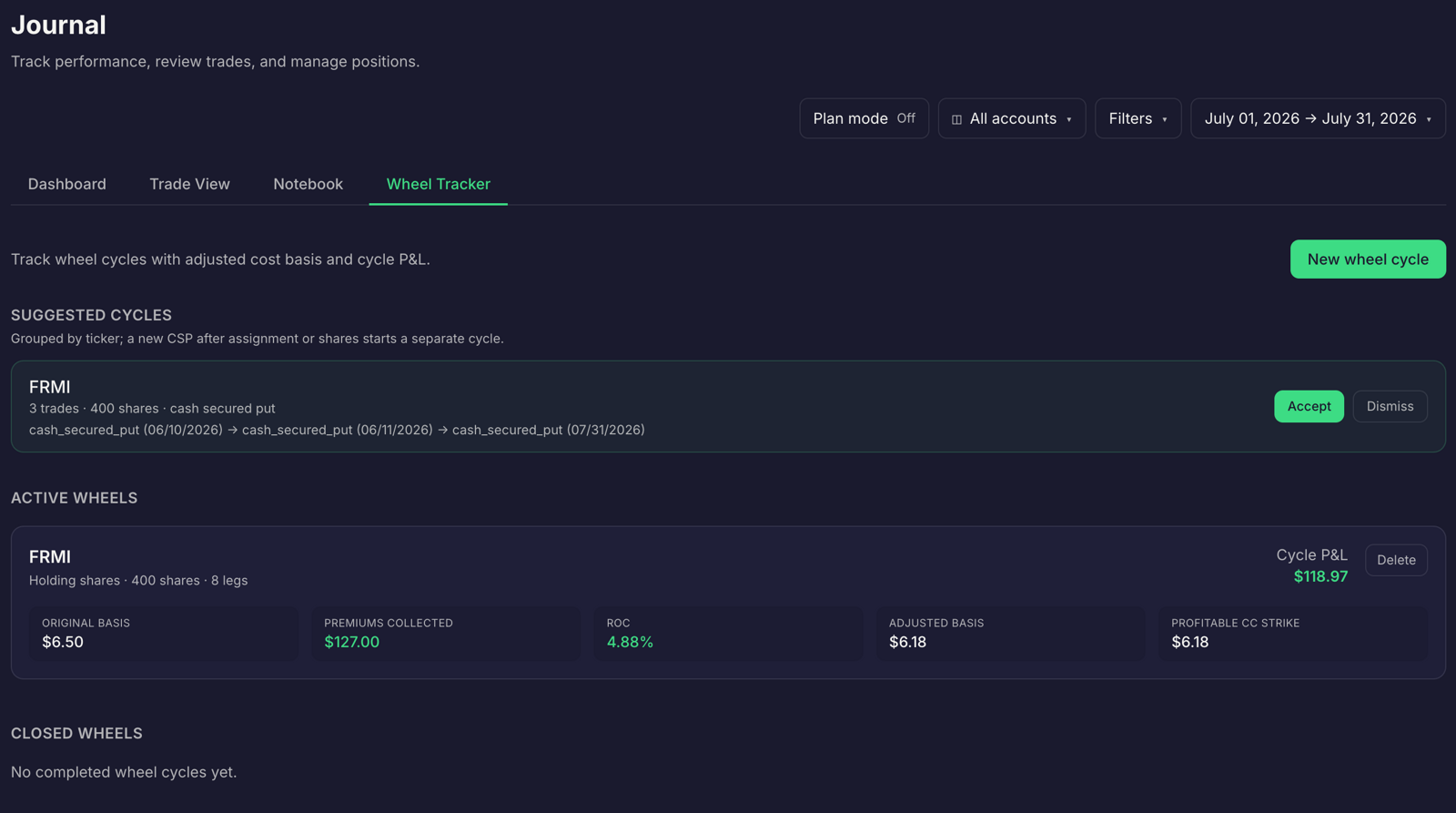
Why Wheel cycle tracking gets fragmented
A Wheel strategy cycle can begin with a cash-secured put and continue through assignment, stock ownership, covered calls, and an eventual exit. Your broker records those as separate events. Premium arrives as option activity. Assignment appears as a stock purchase. Covered calls create more option entries. A roll adds a closing trade and a new opening trade. Dividends and fees may appear elsewhere.
That record is useful for confirming transactions, but it can leave you assembling the strategy’s full result by hand. A spreadsheet may capture the first put and miss a later buyback. A journal entry may record the call without connecting it to the assigned shares. If you update adjusted cost basis manually, one missed credit can change the number.
The alternative is to keep the transactions distinct but connect them under one cycle record. That gives you a continuous view from the first put through the final exit, without treating each leg as an unrelated trade. Assignment can happen before expiration, so check your broker’s records when the position changes. FINRA explains options assignment.
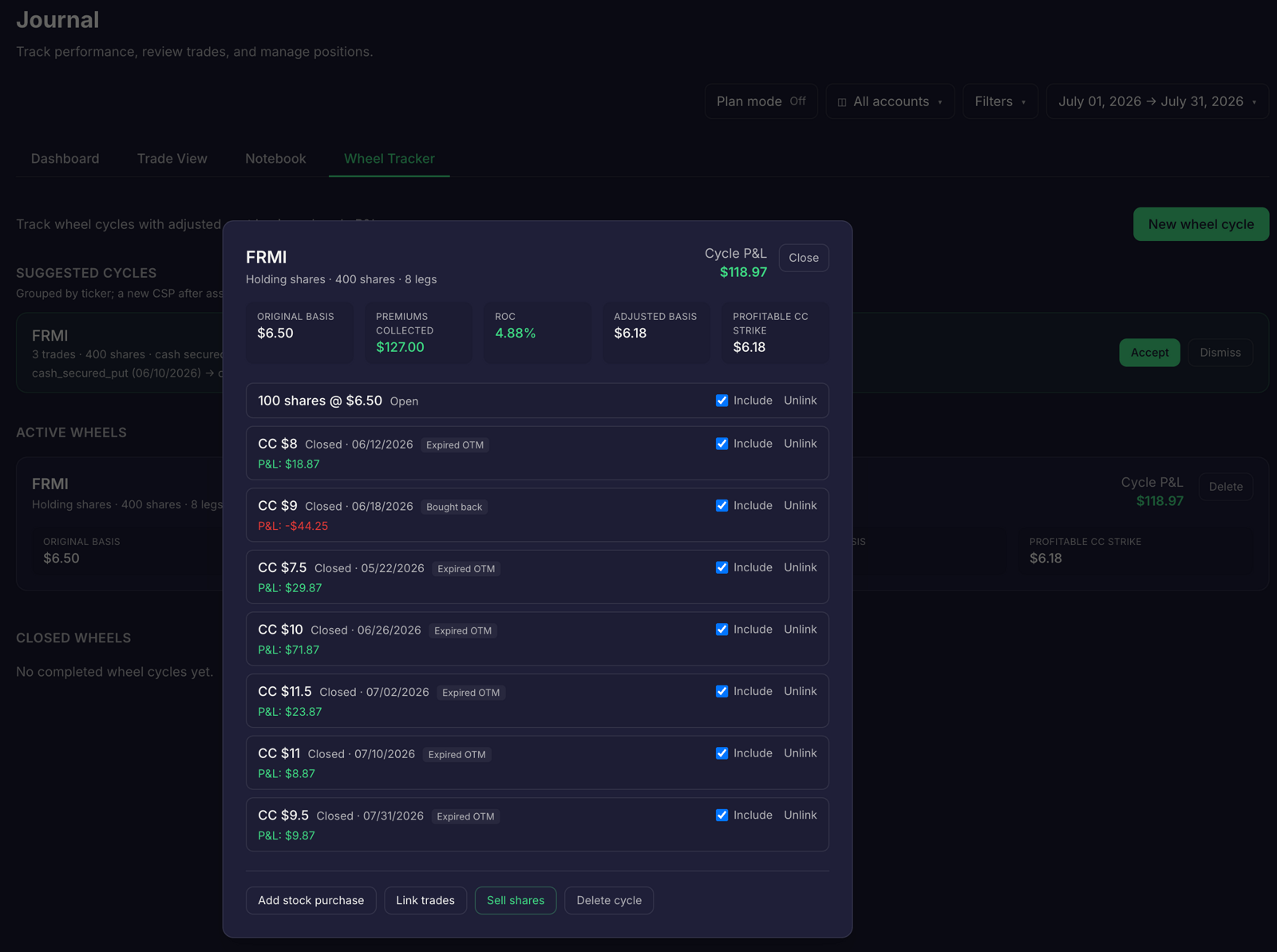
Put the whole cycle in one record
Create one cycle record for each run through the strategy on an underlying. Start it when you sell the initial cash-secured put. If it expires worthless or you close it and hold no shares, record the realized result and close that cycle. If you’re assigned, keep the record open while you hold the shares and sell covered calls. Close it when the shares are called away or you sell them.
Include the details you need to explain the result later:
- Record the starting put: ticker, dates, strike, contract count, premium received, and any closing or roll debit.
- Track assignment and shares: assignment date, number of shares, purchase price, and any stock-related fees.
- Update adjusted cost basis: show the assignment price and net option premiums allocated to the shares. Keep dividends visible as a separate cash flow.
- Log each covered call: strike, expiration, contracts, credit, and whether it expired, was bought back, rolled, or was assigned.
- Capture dividends and fees: include them in the cycle’s cash flows so they don’t disappear from the final review.
- Close with final P/L: account for share-sale proceeds, stock purchase cost, net option credits and debits, dividends, and fees.
For a simple management view, adjusted basis per share can be tracked as the share purchase price less net option premium allocated per share. Keep the calculation consistent across cycles. This is a strategy-tracking figure, not necessarily your tax basis; use broker records and qualified tax guidance for tax reporting.
For final economic P/L, count all related cash flows once: stock-sale proceeds minus stock purchase cost, plus net option premiums and dividends, minus fees. When you roll, enter the closing debit and new opening credit separately. A roll changes the position; it doesn’t erase the cost of closing the earlier contract.
Takeaway: Use a cycle ID or a dedicated Wheel cycle record to connect every event, and reconcile it against broker confirmations.
Size the cash-secured put before opening the cycle
Before selling a put, define how much capital you’re prepared to commit if assigned. A cash-secured put can lead to a stock position, so consider the strike, contract count, and cash needed together. Don’t judge size by premium alone.
A cash-secured put calculator can help organize those inputs and make the planned contract count and cash requirement visible before you place an order. In Traders Tool Chest, CSP/CC options-income planning, including its cash-secured put calculator, is included with Premium ($120/month) or available as a Pro add-on ($30/month). The Pro plan is $60/month before add-ons.
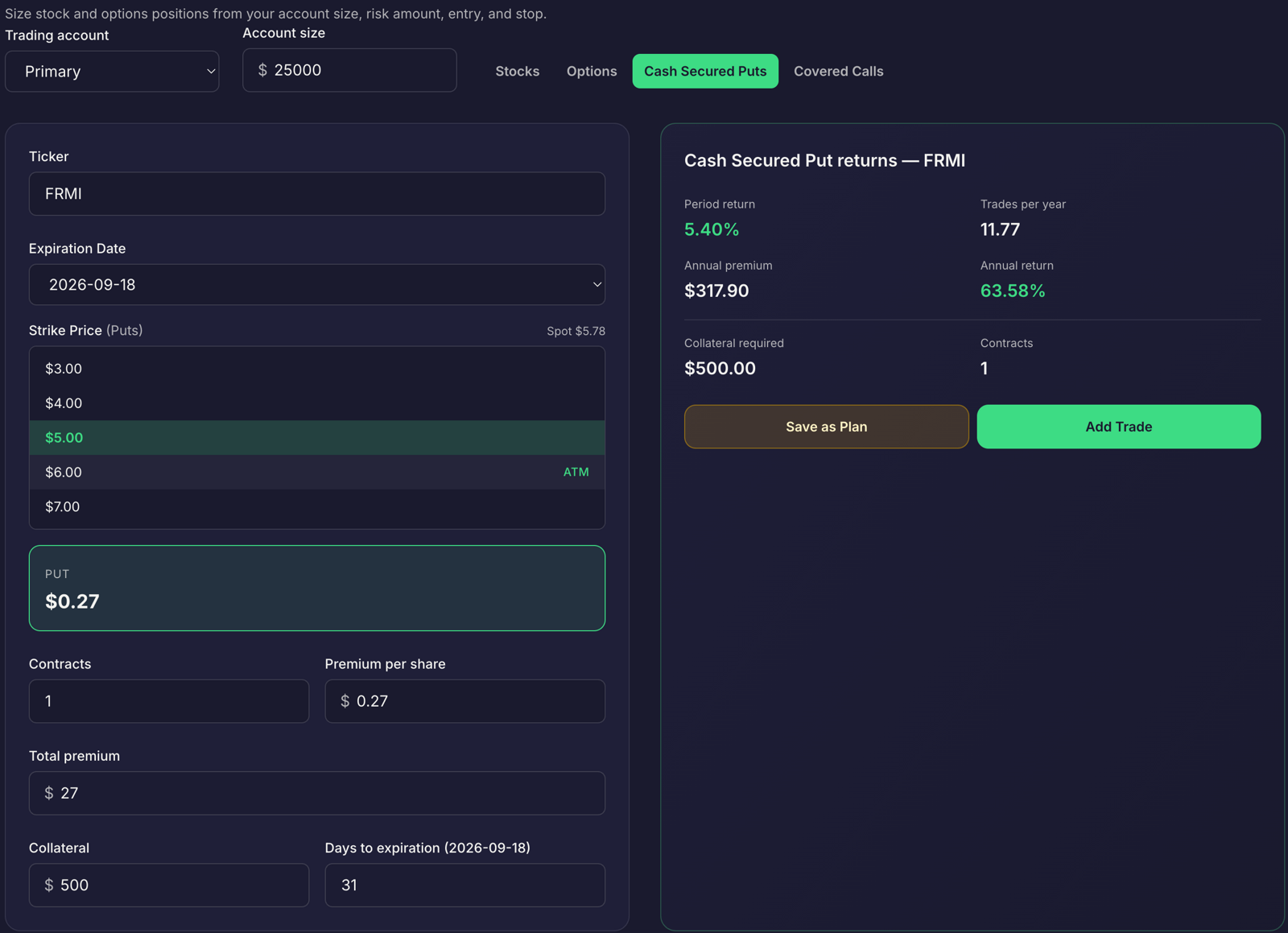
Use the plan as preparation, then place orders with your broker. Traders Tool Chest market data is roughly 15 minutes delayed. The platform is not built for scalping or sub-minute execution.
Size the covered call against the shares you hold
After assignment, connect each covered call to the shares it covers. Check that the contract count matches your stock position and consider the strike in relation to your adjusted basis and intended exit. If you roll, preserve both sides of the transaction in your cycle record.
A covered call calculator helps you review the share count, strike, credit, and potential outcomes together. Traders Tool Chest’s CSP/CC options-income planning, including its covered call calculator, is included with Premium ($120/month) or available as a Pro add-on ($30/month).
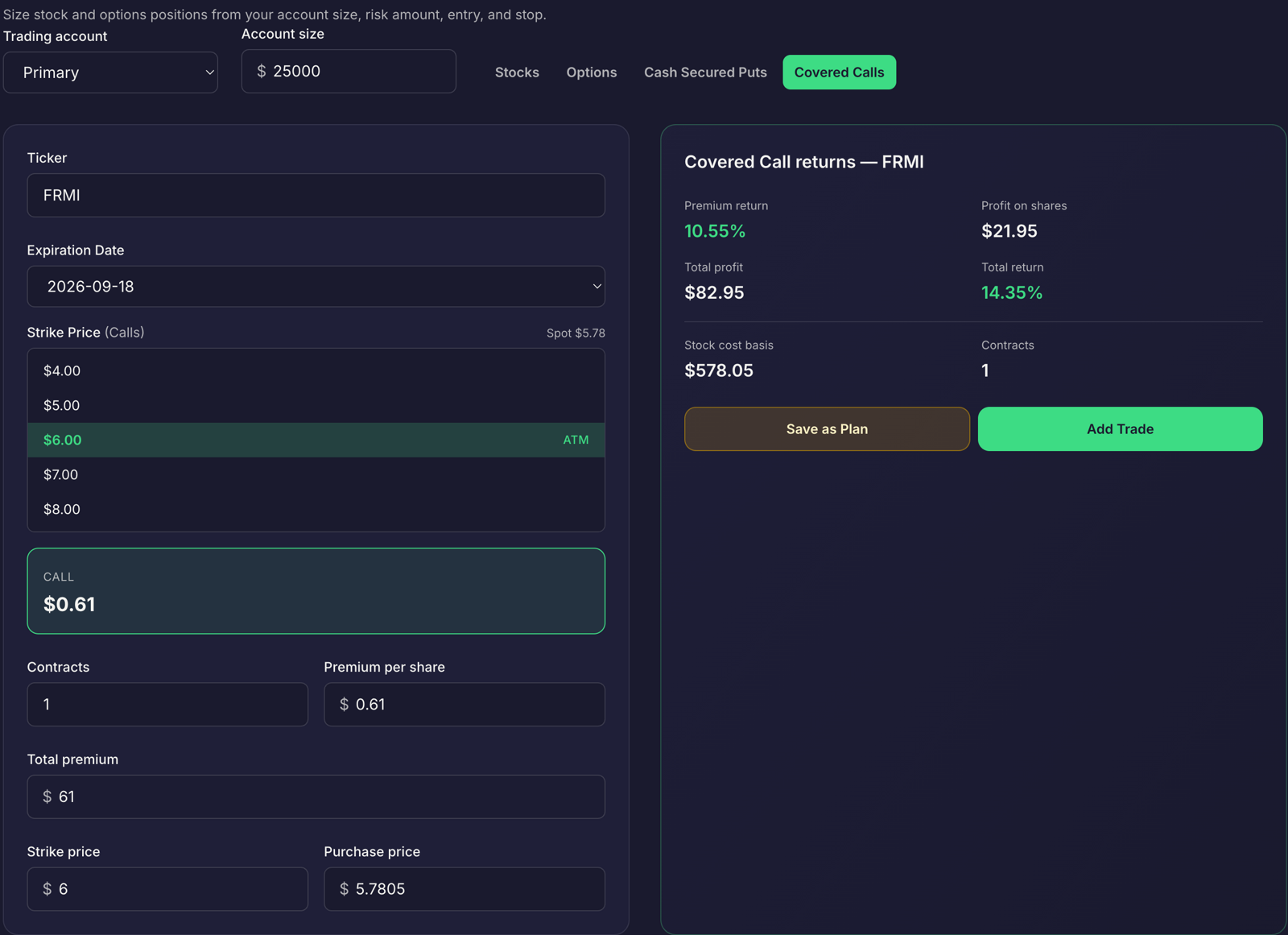
The calculation supports planning; it does not decide whether to open, close, or roll the call. Orders are placed with your broker. Keep your own review focused on what happened: Was the call assigned? Did you buy it back? Did it expire? Did the shares remain in your account?
Compare completed cycles, not isolated premiums
A high premium on one option leg doesn’t tell you how the full Wheel cycle performed. Compare closed cycles using the same accounting approach and review the context around each result.
- Group cycles by ticker or strategy rules to see whether outcomes differ across your process.
- Compare net cycle P/L and days in the cycle rather than ranking trades by opening credit.
- Review rolls and buybacks to understand how much the management decisions changed the original credits.
- Include dividends and fees so that the comparison reflects the whole cycle.
- Separate open from closed cycles so that unrealized positions don’t look like final results.
Traders Tool Chest’s Wheel Tracker keeps the Wheel cycle together with adjusted cost basis and cycle history. It’s included with Premium ($120/month) or available as a Pro add-on ($30/month). The Journal also supports Trade Replay and AI Insights for reviewing trades and identifying patterns in your recorded activity. Automated broker syncing is available through SnapTrade; check your records to confirm that cycle events are complete.
To explore plans and feature availability, review Traders Tool Chest pricing. For a practical guide to position sizing, see how to use Risk Management.
FAQ
What should I look for in the best trading journal for Wheel strategy?
Look for a way to connect puts, assignment, shares, covered calls, rolls, dividends, and final P/L in one cycle view. You should be able to see adjusted cost basis and compare completed cycles without rebuilding the history from separate entries.
What should a Wheel strategy tracker record?
Record each option and stock event, including opening credits, buybacks, assignment, share cost, covered-call outcomes, roll transactions, dividends, fees, and the final exit. Keep a consistent adjusted-basis method and reconcile your records with your broker.
Is Wheel Tracker included with Pro?
No. Wheel Tracker is included with Premium ($120/month) or available as a Pro add-on ($30/month). The Pro plan is $60/month before add-ons.
Can Traders Tool Chest place Wheel trades for me?
No. You place orders with your broker. Market data is roughly 15 minutes delayed, so Traders Tool Chest is not built for scalping or sub-minute execution.
A tracking tool can organize your process, calculate, and help you review. No tool guarantees profit, and every trading decision remains yours.