TradeZella vs Edgewonk vs Tradervue: Which Trading Journal Fits Your Options Workflow?
Choosing an options trading journal is easier when you start with the work you need it to do. Do you need accurate records of assignments and expirations? Contract-based sizing before an order? A review of how closely you followed your strategy? Or scanning and planning as well as post-trade analysis?
TradeZella, Edgewonk, Tradervue, TraderSync, Journali, and Traders Tool Chest address different parts of that process. This guide compares their publicly described features so you can choose by workflow, not by a ranked list. Product details can change, so check the linked feature and pricing pages before subscribing.
Compare the tasks, not just the feature lists
| What to evaluate | Traders Tool Chest | TradeZella | Edgewonk | Tradervue | TraderSync | Journali |
|---|---|---|---|---|---|---|
| Options lifecycle | Plan and journal options trades; Wheel Tracker keeps Wheel activity together. Check how your broker’s assignment, expiration, and roll data comes through. | Offers options journaling and replay. Confirm how your broker’s expiration, assignment, and roll events are recorded. | Supports options imports. Its public materials describe parsing expired options and assignment/removal events for some imports; confirm your broker and export. | Manage Options and the Execution Editor let you adjust open option legs, including recording an expiration when broker data is incomplete. | Offers multi-leg options reporting. Test the exact lifecycle events and broker import that matter to you. | Public materials list options support; confirm how the journal handles spreads, assignments, expirations, and rolls. |
| Contract-based sizing | Risk Management calculates option contract quantity from your account and trade inputs. | Options plans are advertised; check how your desired risk method translates into contract count. | A journal-focused workflow; check whether you need a separate pre-trade sizing tool. | A journal and analytics workflow; check whether your broker or another tool handles sizing. | Check the options sizing workflow against your maximum-risk method. | Confirm whether its entry workflow supports the contract-based sizing you need. |
| Wheel cycle tracking | Dedicated Wheel Tracker. Included with Premium or available as a Pro add-on. | Confirm whether puts, assignment, and covered calls can be reviewed as one cycle. | Confirm whether you can connect the stages as one cycle. | Confirm whether you can connect the stages as one cycle. | Confirm whether you can connect the stages as one cycle. | Confirm whether you can connect the stages as one cycle. |
| Rules and review | Saved strategies connect to Trade Wizard rule checks and journal review. | Offers customizable plans and performance analytics; check how your saved rules connect to reviews. | Supports trade plans, custom tags, and performance reporting. | Offers notes, tags, filters, and reporting for trade review. | Strategy Checker supports rules and plan-adherence review. | Journali describes a pre-trade TradeCheck and AI review features. |
| Broker imports and sync | Automated broker syncing is available through SnapTrade. Check supported brokers and options-data coverage. | Advertises broker and platform integrations; check your broker and the data fields imported. | Offers automated imports for supported platforms, plus spreadsheet import. | Broker sync is listed on paid plans; check supported platforms and options data. | Advertises broker integrations and options imports; verify your broker and fields. | Journali’s published comparison describes manual entry or CSV import; confirm its current options. |
| Replay and AI review | Trade Replay and AI tools are included with Pro and above. AI Insights can help you review patterns such as oversizing or discipline drift. | Its options page advertises second-by-second replay; check replay and AI access by plan. | Review the current plan details for replay or AI functions you require. | Its pricing and options-management pages emphasize journaling and analytics; check whether replay or AI is included for your needs. | Advertises replay and AI analysis; check the replay limits and tools on each plan. | Premier lists AI Trade Coach, AI Reconstruction, and AI Weekly Debrief. |
| Backtesting and discovery | Backtests saved strategy rules on historical market data. Scans more than 10,000 US tickers with full-market access. Confirm options-specific backtest coverage for your strategy. | Offers manual and automated backtesting; confirm support for your specific options instruments and rules. | Offers performance analysis and simulation; check whether it tests your saved options rules against historical options data. | Its published feature pages focus on importing and analyzing trades; check whether a separate backtester fits your process. | Advertises automated backtesting, with stock-options backtesting listed for Elite. | Check whether your workflow needs separate backtesting or market-discovery tools. |
The table reflects features described in public materials, not a guarantee that every broker or plan supports every use case. In particular, test options imports with a representative trade that includes the events you actually handle, such as an expiration, assignment, or roll.
Start with options lifecycle support
An options trade may not end with a single buy and sell. A short put can expire, be assigned, or be rolled. A spread can have multiple legs and partial exits. If those events arrive in separate records, or do not arrive in your broker export, you may need to make corrections to keep your journal useful.
Tradervue documents a Manage Options and Execution Editor workflow for adjusting open options positions, including recording expirations when broker exports omit them. Edgewonk lists options among its supported markets and describes import improvements for certain options events. TradeZella promotes options journaling and replay. For each platform, check that your own broker’s data preserves the contracts and lifecycle events you need.
The Tradervue help article on managing option positions explains its editing workflow. Edgewonk’s supported brokers and platforms and TradeZella’s options journal page are useful places to check next.
Check sizing before you place the trade
A journal can explain what happened after a trade. Your pre-trade process also needs to establish how many contracts fit your risk limit.
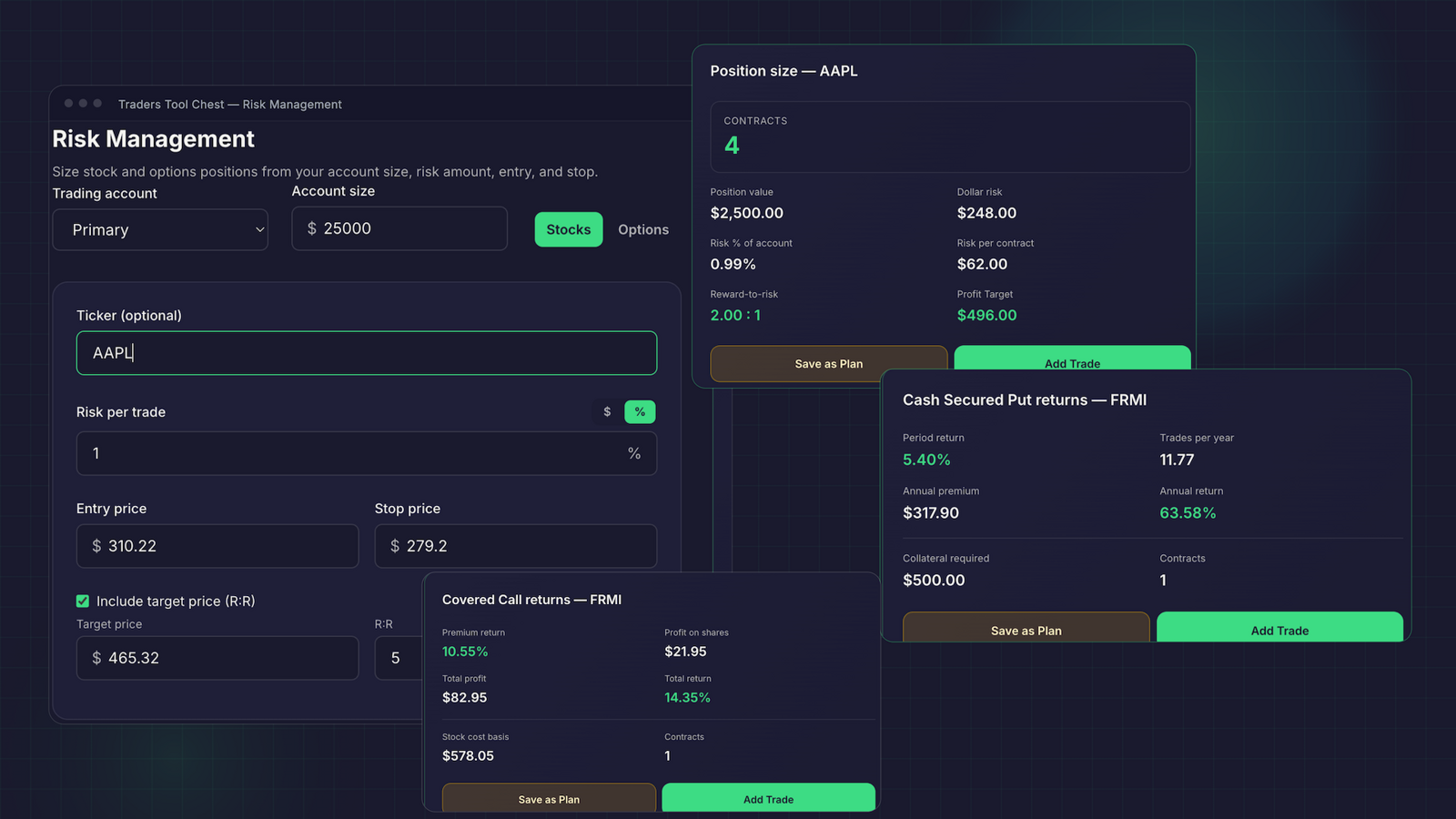
With Traders Tool Chest, you enter your account and trade details in Risk Management to calculate a contract quantity. Trade Wizard then connects the plan, risk, and rule check before you place the order with your broker. You remain responsible for the setup and the final decision.
Other platforms may fit better if you already calculate risk elsewhere and mainly need a journal to analyze completed trades. If you are comparing a TradeZella alternative, an Edgewonk alternative, a Tradervue alternative, or a Journali alternative, check whether you want sizing inside the journal or prefer to keep it in your broker or another calculator.
Decide whether review should connect to your strategy
A journal is more useful when it helps you compare actual decisions with the rules you meant to follow. That can mean checking whether you entered the right setup, followed your risk limit, or exited according to plan.
Edgewonk focuses on structured journaling and performance analysis. Tradervue provides tags, filters, and reporting. TradeZella promotes customizable trading plans alongside analytics. TraderSync lists a Strategy Checker for plan adherence. Journali describes a pre-trade TradeCheck and AI-powered post-trade review.
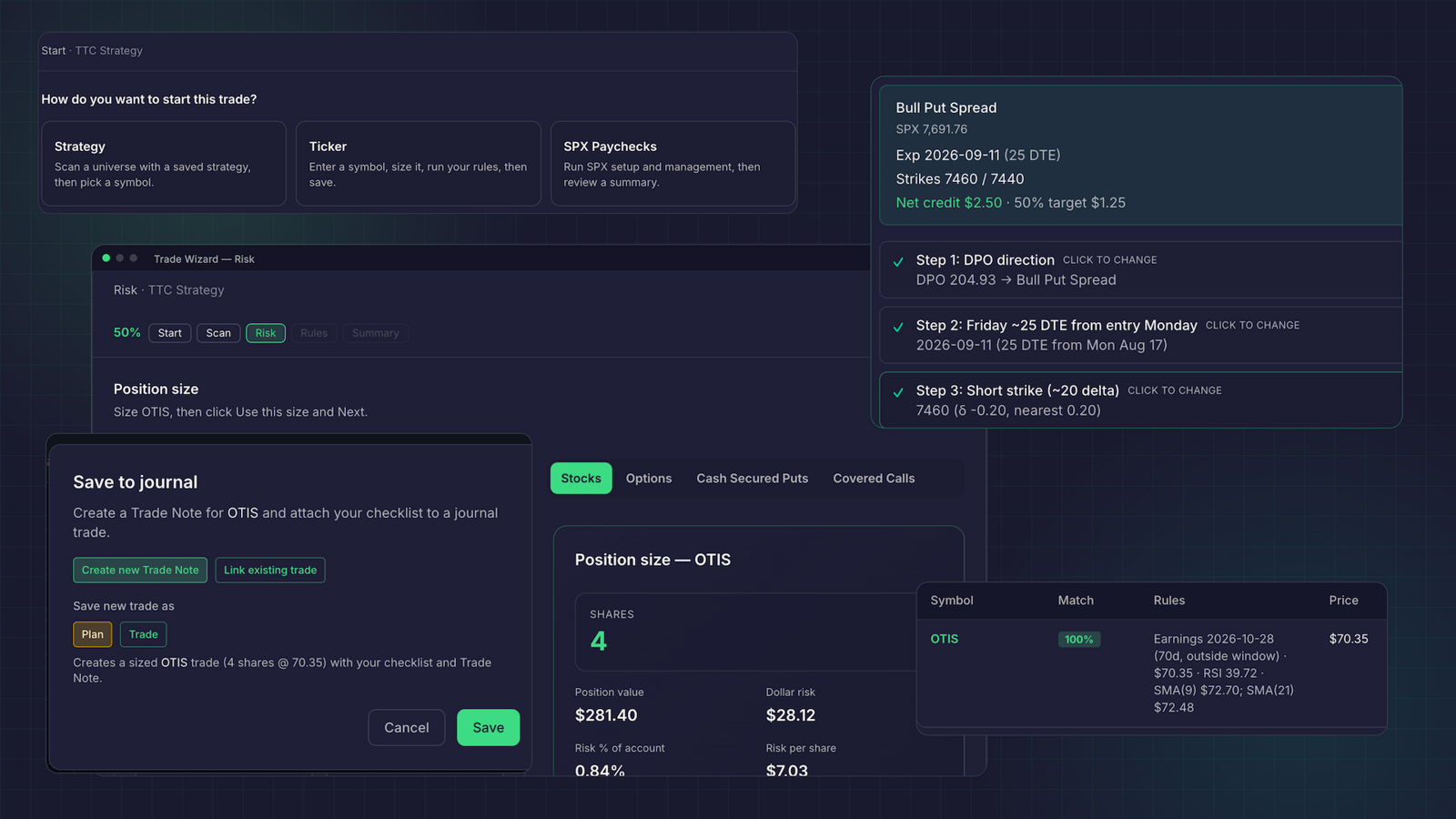
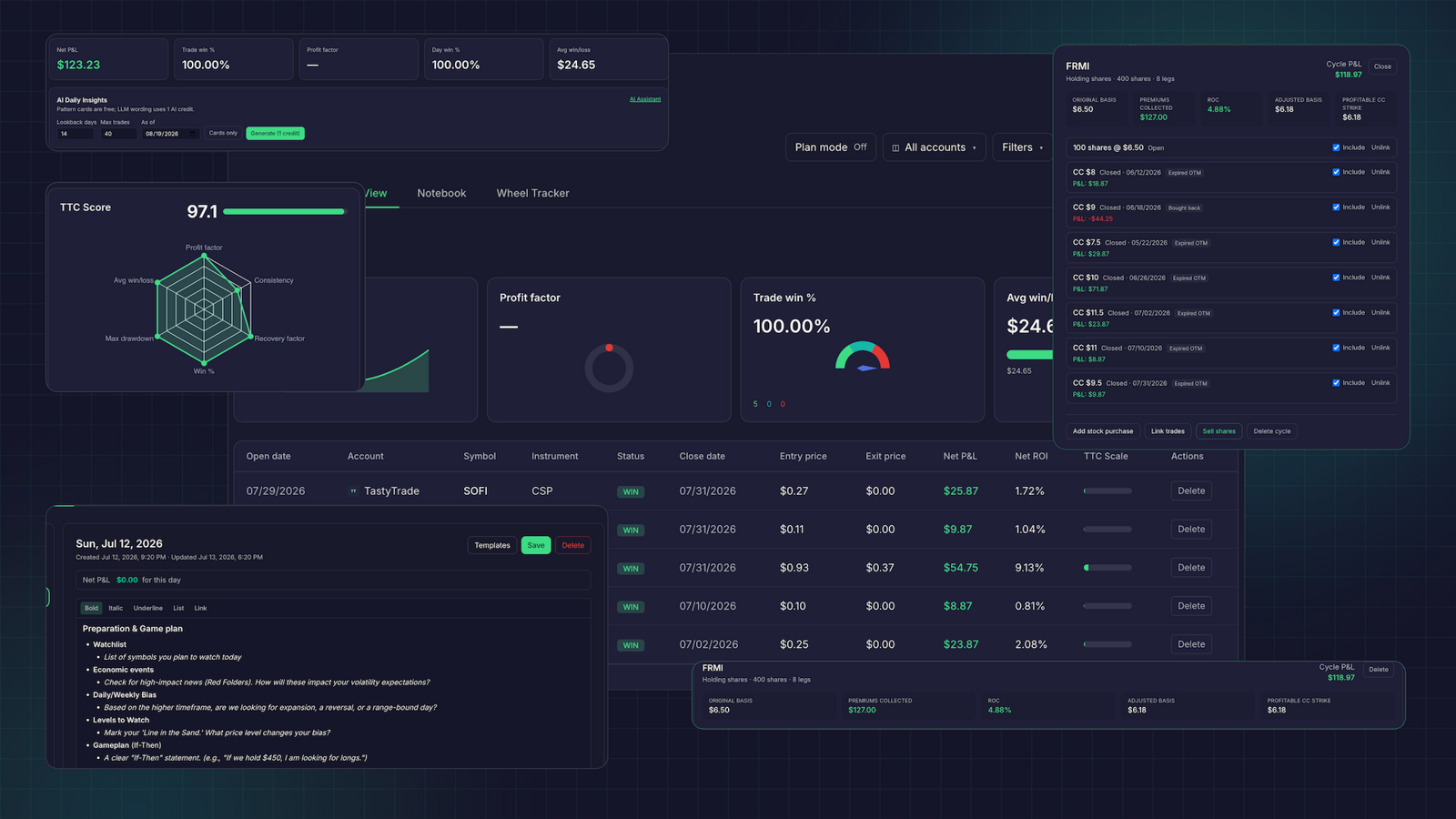
Traders Tool Chest connects saved strategy rules to Trade Wizard and the journal. After a trade, Trade Replay lets you revisit historical candles, while AI Insights can help identify patterns in your journal. Those tools support review; they do not decide whether a trade is appropriate or guarantee an outcome.
Choose a journal-first or connected workflow
If you already have a scanner, sizing process, strategy checklist, and execution routine, a journal-first platform may be all you need. Prioritize the journal’s trade imports, options reports, tags, and review tools. For example, TradeZella highlights options replay and analytics; Tradervue documents tools for managing open options records; Edgewonk offers options imports and detailed performance review. TraderSync’s options feature page describes its options-focused analysis, and Journali’s published comparison outlines its manual and CSV entry approach alongside its AI features.
If you want to connect discovery, planning, sizing, and journaling, Traders Tool Chest brings those steps into one workflow. Its Scanner can search more than 10,000 US tickers with full-market access. That access is included with Premium or available as a Pro add-on. Options-income planning and Wheel cycle tracking are also available with Premium or through Pro add-ons.
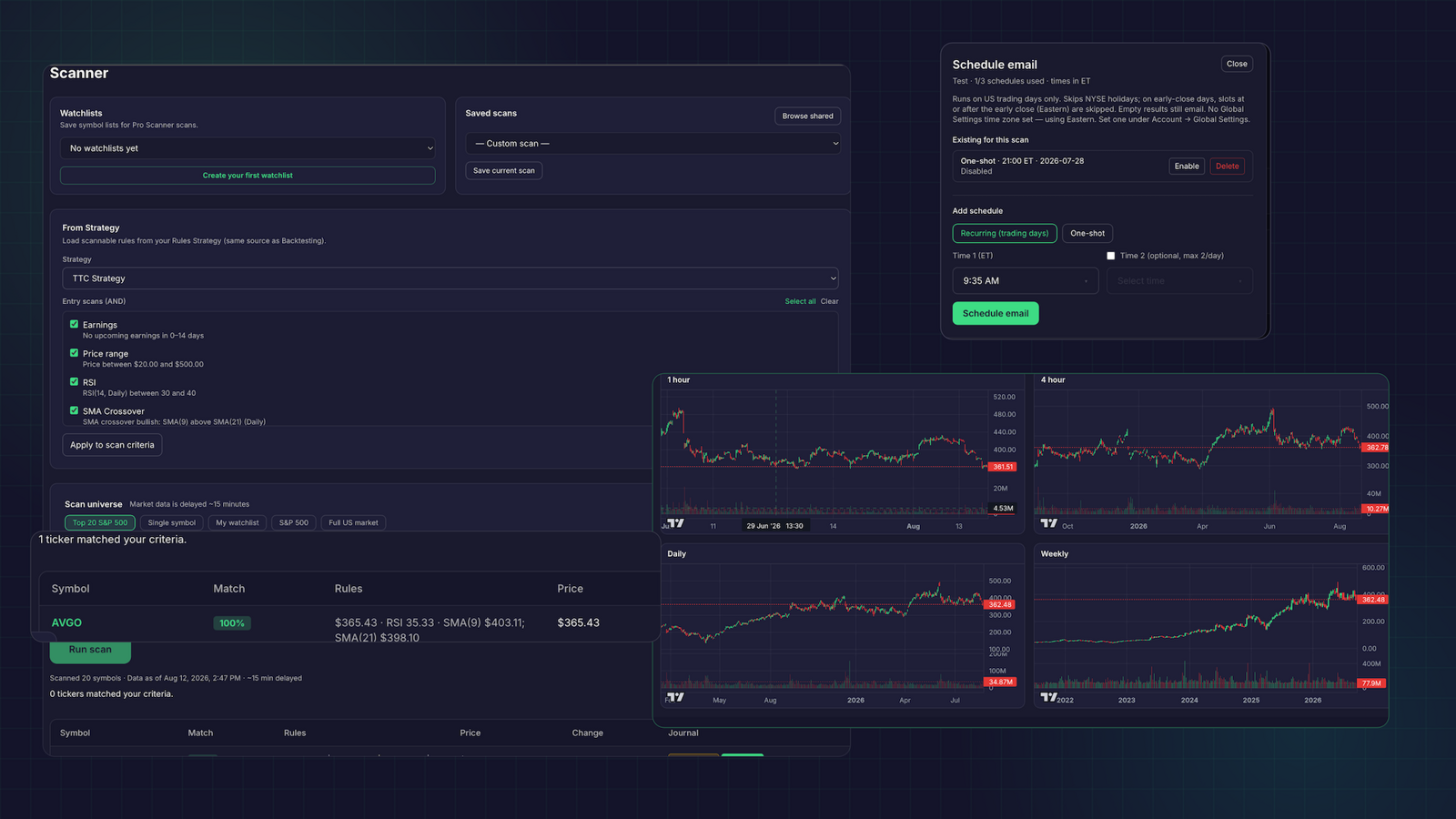
There is a practical limitation to consider: market data is roughly 15 minutes delayed. Traders Tool Chest is suited to planning, scanning, backtesting review, and watchlist building. It is not built for scalpers or sub-minute execution. You also place orders with your broker; the platform supports planning and review around the trade.
Check the plan against the workflow you need
Traders Tool Chest Pro costs $60 per month and includes options trade planning, risk management, Trade Replay, backtesting, and AI tools with included usage credits. Some features are Pro add-ons: full US market scans, CSP/CC options-income planning, SPX Paychecks, and Wheel Tracker are each listed at $30 per month.
Premium costs $120 per month and includes full-market scans across more than 10,000 tickers, options-income planning, SPX Paychecks planning, and Wheel cycle tracking. See the current pricing page for plan details.
We have published additional comparisons for TradeZella, Edgewonk, and Journali. Comparison pages for Tradervue and TraderSync are not built yet.
Make the decision with a test trade
Before you commit, check your broker’s integration and enter or import a representative options position. Verify that the journal records the legs, quantity, costs, and close or expiration correctly. Then try the review functions you expect to use, especially contract sizing, rule checks, replay, and Wheel-cycle reporting.
Choose the tool that handles the work you actually need. A focused journal can be a reasonable choice when your pre-trade process already works. A connected platform may suit you when you want scanning, planning, risk management, and review to stay together.
FAQ
Which trading journal is best for options?
There is no single best fit for every options workflow. Compare how each platform handles your broker’s imports, contract legs, assignments, expirations, sizing, and review needs.
Does Traders Tool Chest support options sizing and Wheel tracking?
Yes. Risk Management calculates options contract quantity from your trade inputs. Wheel Tracker is included with Premium or available as a Pro add-on.
Is Traders Tool Chest built for scalping?
No. Market data is roughly 15 minutes delayed, so the platform is not built for scalpers or sub-minute execution.