
TTM Squeeze 101: A Beginner's Guide to Squeeze Setups
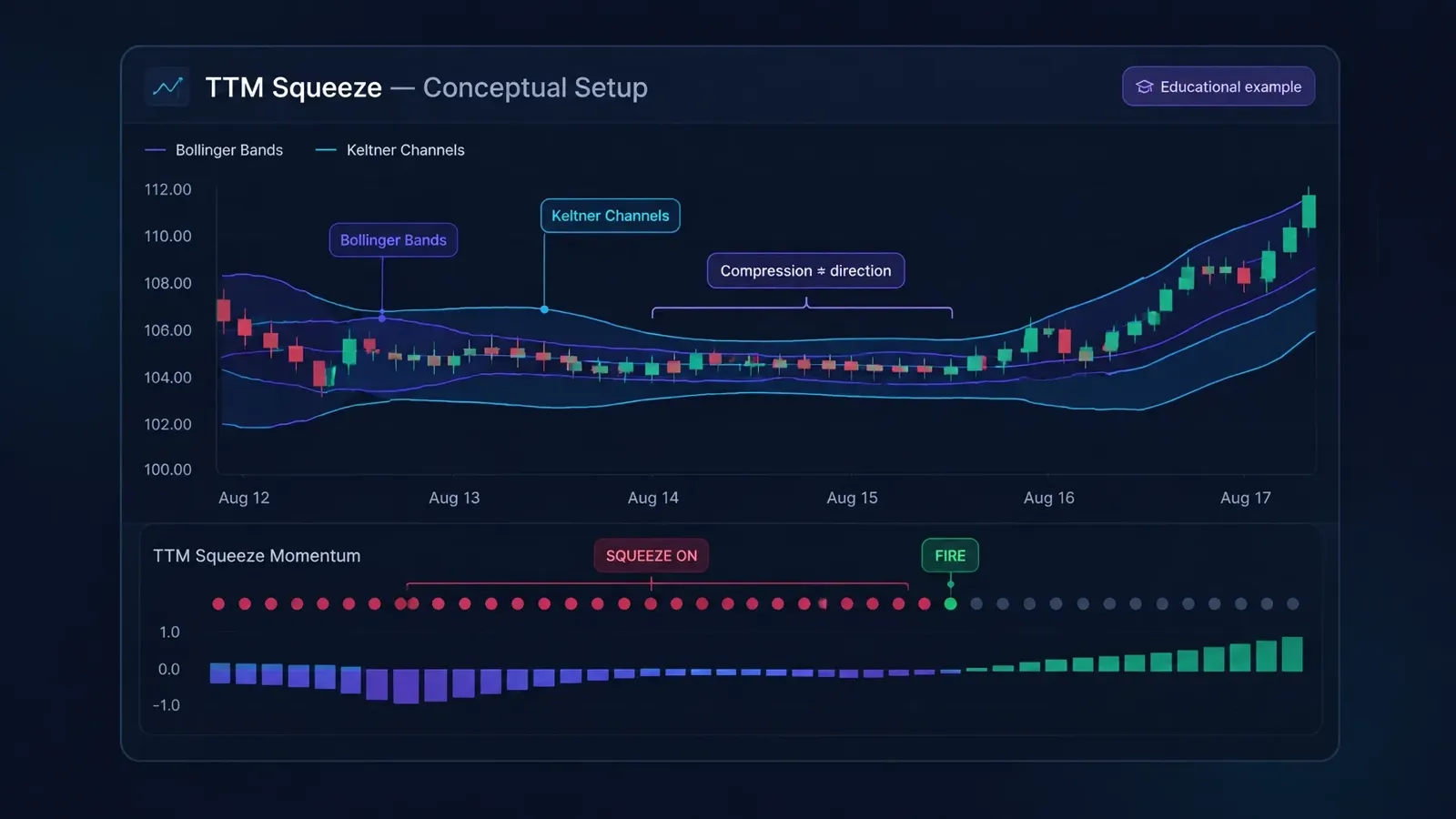
The TTM Squeeze can help you notice when volatility has contracted and may be beginning to expand. It does not tell you which way price will move. To use squeeze setups consistently, you need context, a defined risk plan, and rules you can review, not just a signal on a chart.
This guide explains the mechanics in plain terms, common beginner mistakes, and how to turn the indicator into a testable process.
What the TTM Squeeze measures
The TTM Squeeze is a widely known volatility and momentum concept popularized by John Carter. It compares Bollinger Bands with Keltner Channels:
- Bollinger Bands expand and contract with price volatility, measured using standard deviation.
- Keltner Channels use average true range to reflect the market’s recent price range.
When both Bollinger Bands sit inside the Keltner Channels, many versions of the indicator mark a squeeze as “on.” In plain terms, recent price movement has become relatively compressed. Traders sometimes describe this as a market coiling before a possible move, but compression alone does not guarantee a breakout.
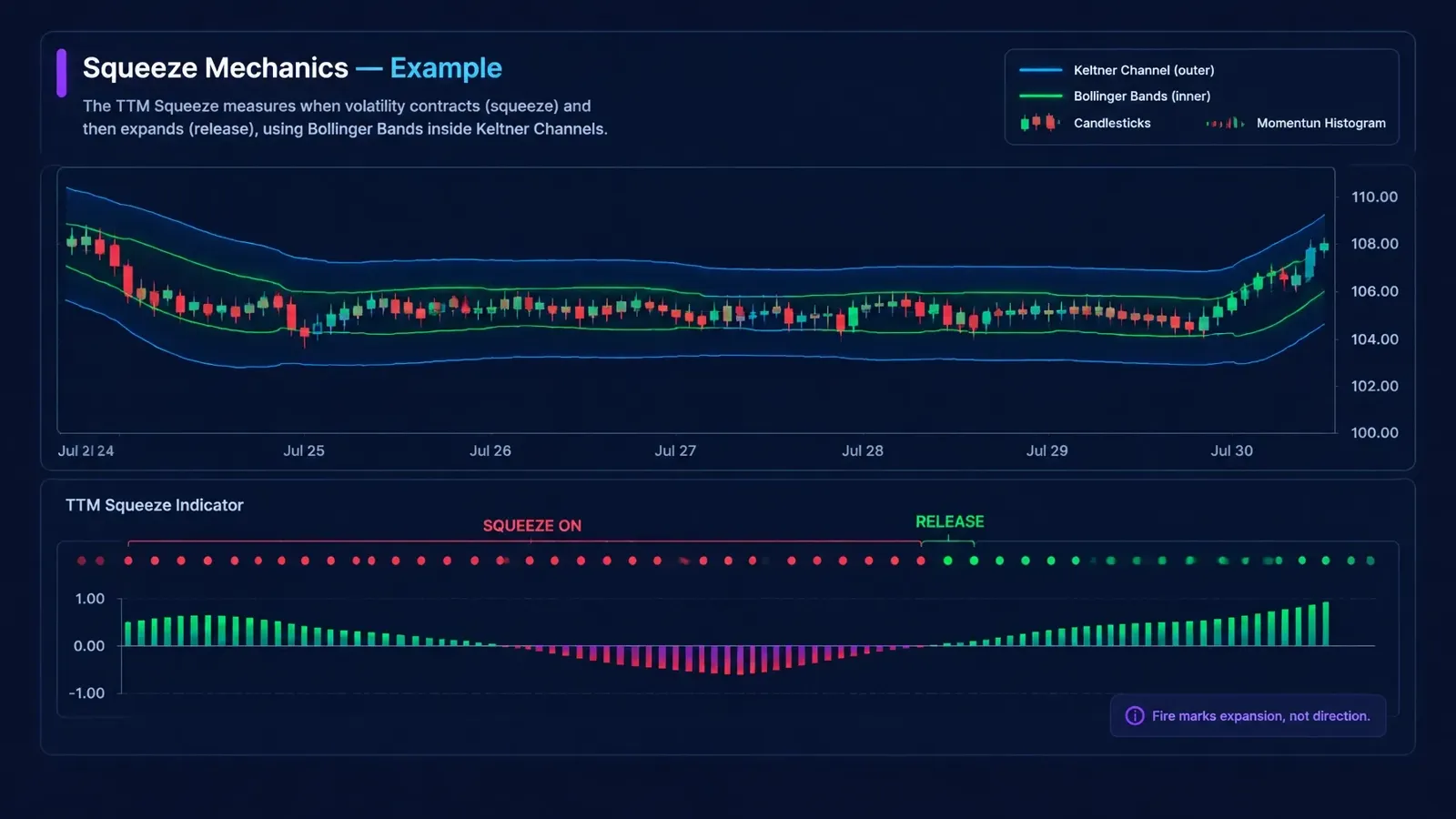
The exact calculations, settings, and signals can vary between platforms. The CQG explanation of the TTM Squeeze describes one implementation and shows the relationship between the bands and channels. Treat the indicator as a tool with parameters to understand, not a universal formula.
What a squeeze “fire” tells you, and what it doesn’t
A squeeze “fires” or releases when the Bollinger Bands move back outside the Keltner Channels. The compressed-volatility condition has ended, and volatility may be expanding.
That is a change in volatility, not a prediction of direction. A fire can occur before a move higher or lower, and price can also move sideways or reverse after the release. The indicator itself does not tell you whether to buy or sell.
Many versions also display a momentum histogram. Traders may use its position relative to zero and whether it is rising or falling as one clue about recent momentum. That clue is not certainty, and implementations can differ. Check how your platform calculates and displays its version.
A useful way to separate the signals:
- Squeeze dots: Is volatility compressed, or has the squeeze released?
- Momentum reading: What direction does recent momentum lean?
- Price context: Is the setup consistent with the market structure and timeframe you trade?
Combine the squeeze with market context
A squeeze setup becomes more complete when you define the conditions around it. Before treating a release as a possible entry trigger, decide what context matters to your approach.
You might specify:
- Trend direction: Do you only consider long setups when the baseline trend is up, or short setups when it is down?
- Higher-timeframe bias: Does the larger chart support the direction you are considering?
- Momentum confirmation: What momentum condition must be present at the release?
- Price structure: Does price need to clear a range boundary, or hold a level you identified in advance?
These are examples, not universal rules. You choose the filters that fit your strategy and timeframe. The goal is to distinguish a signal you would consider from one that merely appears on a chart.
A daily-chart squeeze and a short intraday squeeze can describe different trading contexts. Keep your timeframe consistent across the signal, context filters, and risk plan. Do not treat a chart pattern as a complete setup until you have defined what would confirm it and what would invalidate it.
Avoid common beginner mistakes
The squeeze is easy to spot, so it can be tempting to trade every release. A disciplined process requires more than noticing a fire.
Watch for these mistakes:
- Trading every fire: A release is not a complete entry plan. Apply your trend, timeframe, and confirmation rules first.
- Choosing a stop after entry: Decide where the setup is invalid before you calculate position size.
- Using a stop with no relationship to the setup: A fixed percentage may not reflect the price structure or volatility you are trading.
- Ignoring the baseline trend: A momentum change that conflicts with your broader context may not meet your own setup criteria.
- Treating a stop as guaranteed protection: A planned stop does not guarantee an exit at the exact price, especially if the market moves quickly.
There is no single stop placement that fits every squeeze. Some traders define invalidation around a recent swing point or the boundary of the consolidation range. Others use a different rule that matches their strategy. Whatever method you choose, write it down before entry. If the setup does not fit your account’s risk parameters at that stop distance, reconsider the size or pass on it.
Turn the indicator into written, testable rules
A glance at the indicator can help you find a situation to evaluate. Written rules help you decide whether it qualifies as your setup.
Define each part separately:
- Entry trigger: State what must happen at or after the release before you consider entering.
- Context filters: Specify the trend, timeframe, or momentum conditions required.
- Risk parameters: Define how you select the stop and how much you are prepared to risk.
- Exit conditions: Write what ends the trade, including your target or the condition that invalidates the setup.
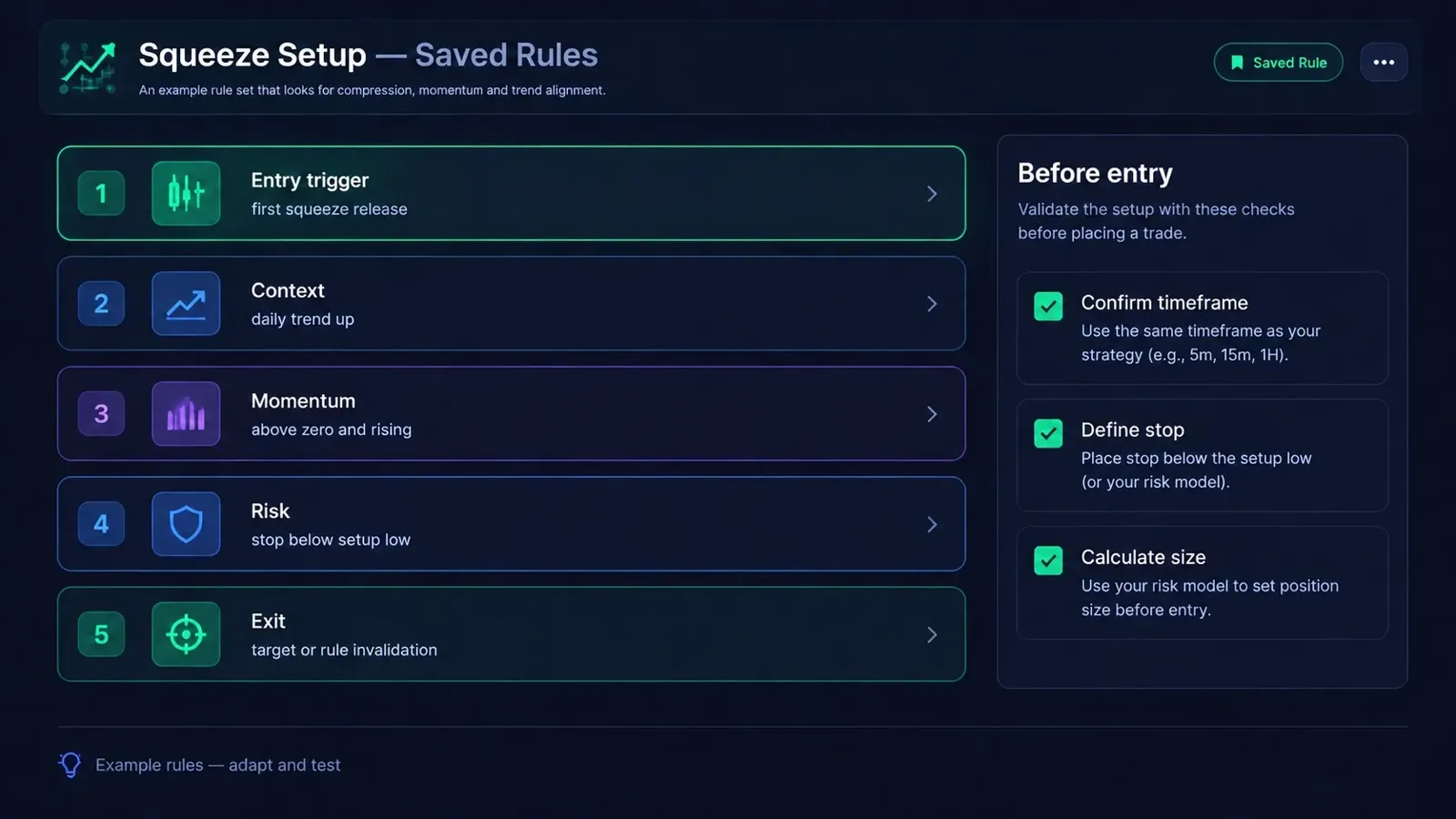
For example, a rule set might require a daily squeeze release, an upward trend filter, and rising positive momentum before considering a long setup. It might then specify a price-structure-based stop and a defined exit condition. This is an illustration, not a recommendation. Your rules should reflect your own strategy.
Traders Tool Chest’s Strategy builder saves entry criteria, context filters, risk parameters, and exit conditions, with pre-built templates available. Its Backtesting engine tests saved rules against historical data and reports measures such as win rate, expectancy, drawdown, and equity curves. Historical results describe past behavior; they do not promise future performance.
Before placing an order, Traders Tool Chest’s Risk Management calculator uses your account size, entry, and stop to calculate a share or contract count. Orders are placed with your broker.
Scan for squeeze setups across the market
Checking charts one at a time can make it hard to compare opportunities consistently. A stock scanner can help you find symbols that match defined conditions, then you can review the charts and decide whether any fit your complete setup.
The Traders Tool Chest Scanner covers technicals, momentum, TTC Compression, The Strat, and options strategies. Full US market scans across 10,000+ tickers are a $30/month Pro add-on or included with Premium at $120/month. Pro is $60/month for the core plan. See current details on the pricing page.
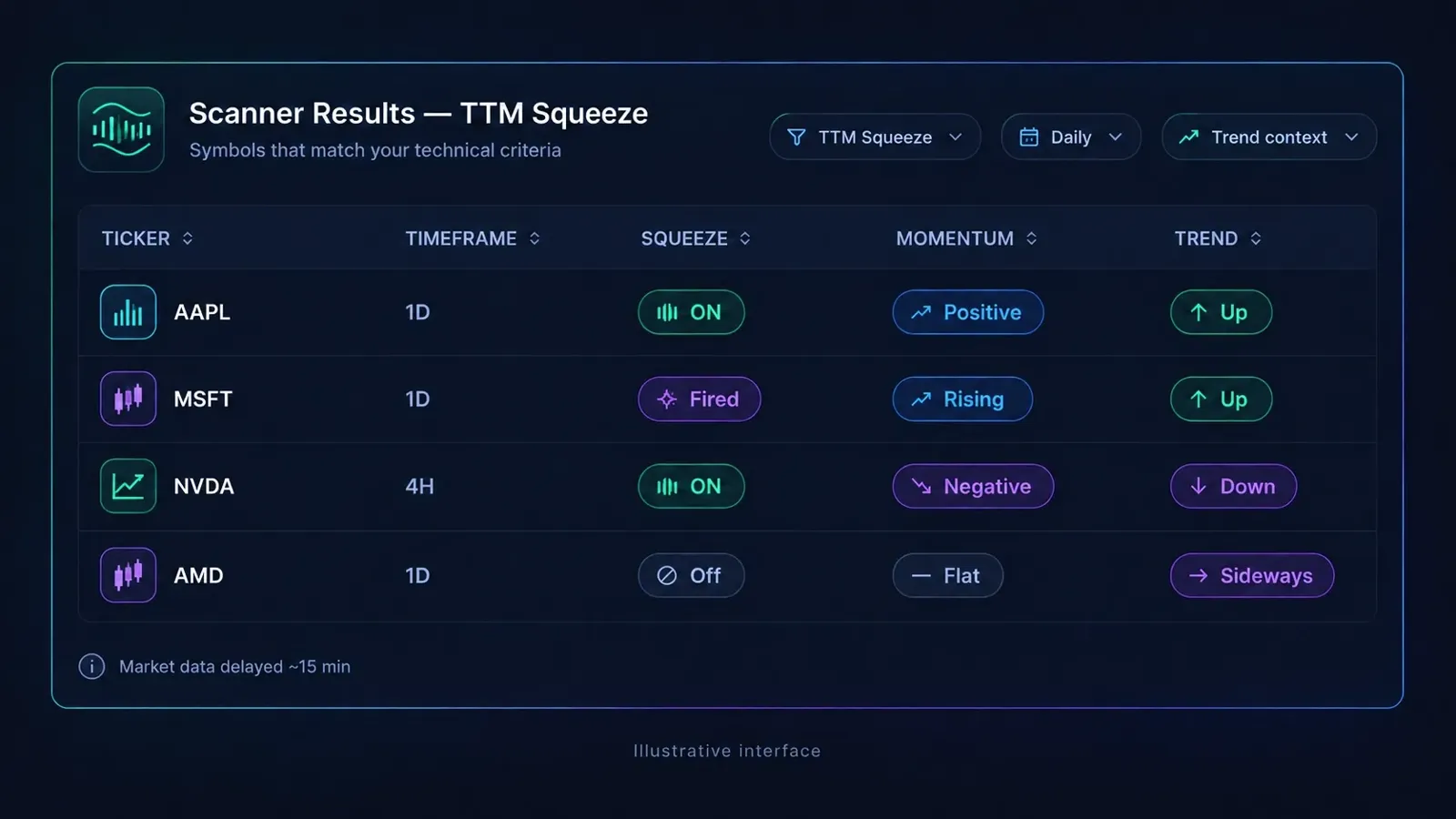
Use scan results as a shortlist, not an instruction to trade. Review each chart against your written rules and calculate risk before considering an order. You remain responsible for reviewing the setup and placing orders with your broker.
A practical takeaway
Treat the TTM Squeeze as a way to identify volatility compression and a possible transition into expansion. It does not predict direction. Use your trend and momentum context to define what you will consider, then write down the trigger, risk, and exit rules before acting. Scan to find candidates, review them against those rules, and use your journal to assess how closely you followed the plan.
Frequently asked questions
What does a TTM Squeeze actually signal?
It signals that Bollinger Bands have moved inside Keltner Channels, a condition associated with compressed volatility. A release marks the end of that condition; it does not guarantee a breakout.
Does the squeeze predict direction?
No. The squeeze identifies volatility compression and release, not whether price will rise or fall. Traders may use trend, momentum, and price structure to form a directional plan, but those signals are not guarantees.
How long can a squeeze last?
There is no fixed duration. It can persist for different lengths of time depending on the instrument, timeframe, and indicator settings. Define in advance how your strategy handles a squeeze that continues or ends without a qualifying setup.
Can you scan for squeeze setups?
Yes. Traders Tool Chest can scan for TTC Compression conditions. Full US market scans across 10,000+ tickers are a $30/month Pro add-on or included with Premium at $120/month. Market data is roughly 15 minutes delayed.
Disclaimer
This article is for educational purposes only and is not financial advice or a recommendation to buy or sell any security. Trading involves risk. Historical results do not guarantee future outcomes. Every decision remains yours.