
R-Multiple Explained in Under 3 Minutes
What does R mean?
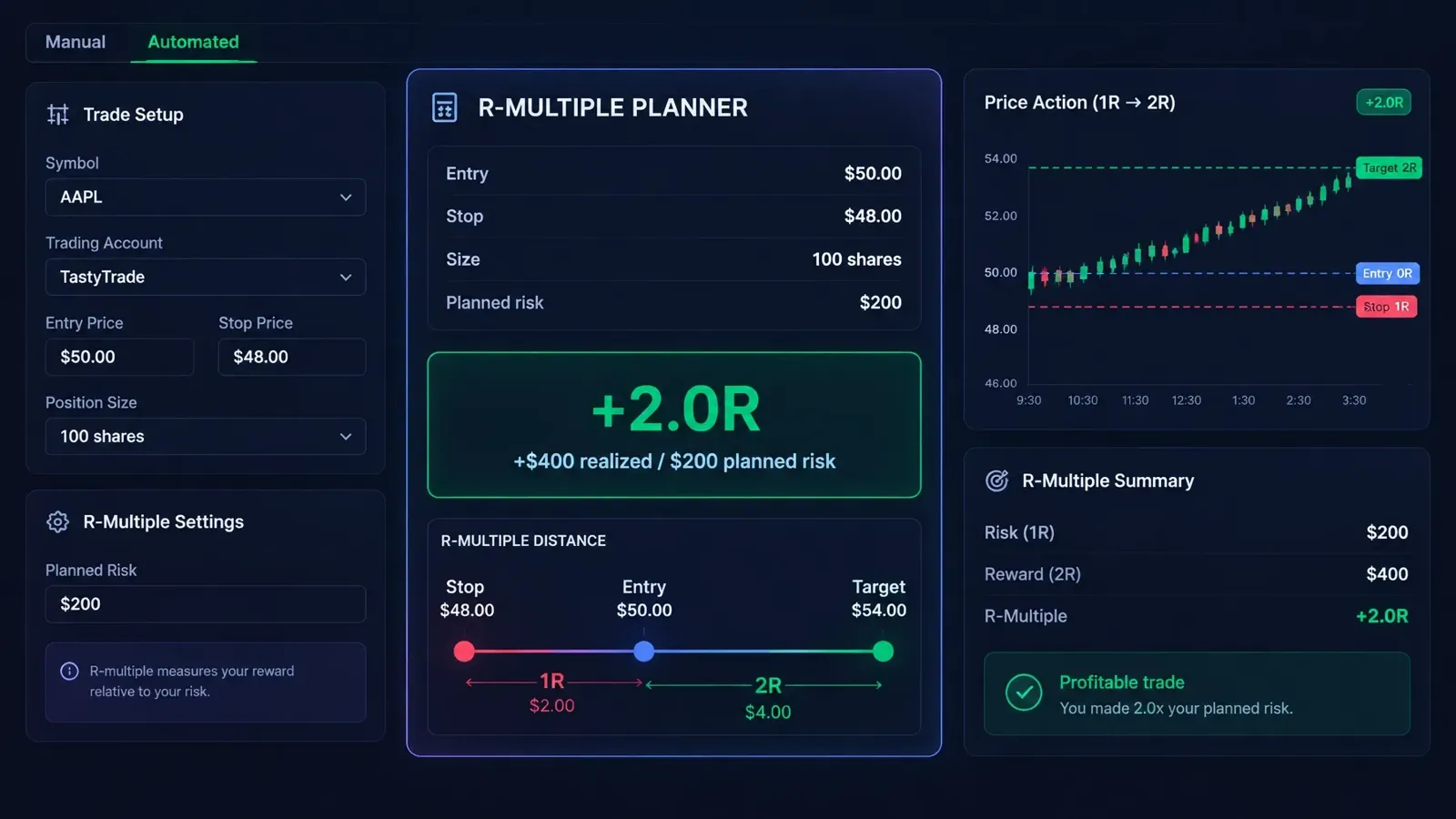
R is one unit of planned risk on a trade. Calculate it using the distance between your entry and initial stop, multiplied by your position size.
For example, if you buy 100 shares at $50 and set your stop at $48:
($50 − $48) × 100 shares = $200 planned risk, or 1R
A reward-to-risk calculator can help define the numbers before entry. For more on sizing positions from an entry and stop, see our guide to position sizing rules.
Convert the trade result into R
Your trade’s R-multiple is its profit or loss divided by its original planned risk:
R-multiple = net trade result ÷ planned risk
If the example trade makes $400, that’s +$400 ÷ $200 = +2R. If it loses $200, that’s −$200 ÷ $200 = −1R.
Because the result is measured against planned risk, +2R means the same thing on a small trade and a large one. Dollars show the amount earned or lost; percentages can vary with account size. R gives you a shared yardstick for comparing trades and strategies.
A stop sets planned risk, not a guaranteed fill price. Gaps, slippage, and execution can make the actual loss larger than 1R.
Calculate expectancy in R
Expectancy estimates the average result per trade:
Expectancy = (win rate × average win in R) − (loss rate × average loss in R)
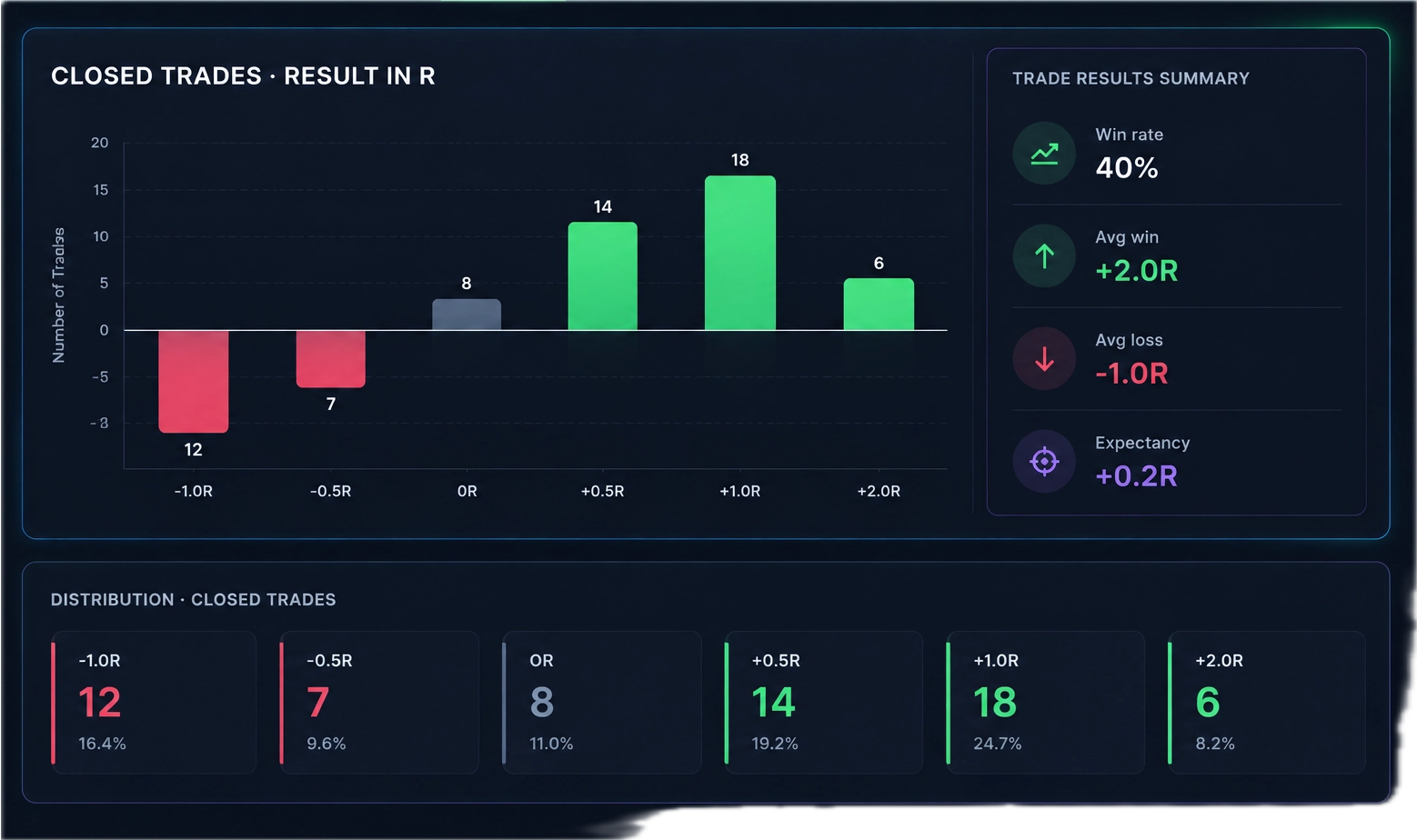
Suppose 40% of your trades win an average of +2R, while 60% lose an average of −1R:
(0.40 × 2R) − (0.60 × 1R) = +0.2R per trade
That’s a historical average, not a promise about future trades. Costs can reduce expectancy, so calculate it using actual results where possible. There’s no single “good” number for every strategy; assess expectancy alongside the sample size and drawdowns.
When comparing strategies, backtesting software for trading can help evaluate expectancy against historical rules. Traders Tool Chest’s Backtesting feature is available on Pro and Premium and reports win rate, expectancy, drawdown, and equity curves. Historical results don’t predict future performance.
Review your process, not just the outcome
A losing trade can still follow your plan. A winner can still break your rules. Use a short trade review checklist:
- Record the planned risk and initial stop.
- Check whether the entry and exit followed your rules.
- Compare realized R with the plan.
- Note any change in size, stop, or execution.
The difference between planned R and realized R can help you spot execution issues without treating every loss as a process failure.
In Traders Tool Chest, Trade Wizard helps define risk and reward and calculate position size, then pushes plans to the Journal. Stock trade planning is available on Free; stock and options planning is available on Pro and Premium. Market data is roughly 15 minutes delayed; TTC is not built for scalpers or sub-minute execution. Orders are placed with your broker.
Frequently asked questions
What does +2R mean?
+2R means the trade made twice its original planned risk. If 1R was $200, a +2R result is a $400 gain.
What is a good expectancy?
There’s no universal target. Positive expectancy over a meaningful, representative sample can be useful to assess, but it doesn’t guarantee future results. Include costs and review drawdowns, too.
Is R-multiple only for day traders?
No. You can measure R on trades held for minutes, days, or longer. It applies whenever you can define planned risk and calculate the trade result.
How do you calculate R?
Divide the trade’s net profit or loss by its original planned risk. For a stock trade, planned risk is the entry-to-stop distance multiplied by the share count. Use the initial risk as the denominator even if you later adjust your stop.
Disclaimer
This article is for educational purposes only and is not financial advice. Trading involves risk, and actual execution can differ from your plan.
Start logging every closed trade in R.